ラベル Identity Management の投稿を表示しています。 すべての投稿を表示

[Identity] Oracle Identity Cloudを使ってJiraとSSOを構成する方法/How to set up SSO Integration with Jira using Oracle Identity Cloud

原文はこちら。
https://blogs.oracle.com/cloud-platform/how-to-set-up-sso-integration-with-jira-using-oracle-identity-cloud

以前の記事では、Oracle Identity Cloud Serviceを利用して数分のうちにSlackとシングルサインオン(SSO)を構成する方法を実演しました。今回の記事では同様に、多くの人が使っているイシュー/プロジェクトトラッキングツールであるJira SoftwareとID統合を行う方法を実演します。
最初のステップはIdentityプロバイダのメタデータから署名証明書にアクセスすることです。証明書の情報を取得したら、次にJiraに管理者としてアクセスし、ユーザー管理コンソールからSAMLシングルサインオン接続を構成しましょう。
この接続の構成の際、Identity Provider Entity IDやSSO URLなどの基本的な情報が必要になります。最初のステップで取得した署名証明書を使い、パブリックx509証明書をこのページで生成しましょう。設定を保存したら、Oracle Identity Cloudに戻って、App CatalogからJiraを選び、アプリケーションとして追加しましょう。最後のステップとして、統合をアクティベートし、JiraにSSOを使ってアクセスできるようにしたいユーザーを追加しましょう。
Oracle Learning Library YouTubeチャンネルのこの動画では、SSOでのJiraとのID統合を行う方法を、ステップバイステップで説明しています。

包括的なセキュリティおよびアイデンティティプラットフォームについて知りたい方は、以下のURLにアクセスしてください。無料でお試しいただけます。
Oracle Identity Cloud Service
https://cloud.oracle.com/ja_JP/identity
Try for Free!
https://cloud.oracle.com/tryit

[Identity Management] Integrating SSO with Slack in Minutes

原文はこちら。
https://blogs.oracle.com/cloud-platform/integrating-sso-with-slack-in-minutes

以前のエントリで、Oracle Identity Cloud Service(IDCS、以下IDCS)で簡単にServiceNowとのSSO(Single Sign-on)を構成できることを説明しました。
How to set up SSO Integration with ServiceNow using Oracle Identity Cloud
https://blogs.oracle.com/cloud-platform/how-to-set-up-sso-integration-with-servicenow-using-oracle-identity-cloud
https://orablogs-jp.blogspot.com/2019/01/how-to-set-up-sso-integration-with.html
Oracle Identity Cloud Service
https://cloud.oracle.com/ja_JP/identity
今回は、同じ方法を使ってSlackとID統合ができることを説明します。

最近のクラウドアプリケーションでは最新のidentity and access management(IAM)アーキテクチャを必要としています。IDCSはAPIファーストなアーキテクチャで構築されており、SCIMやOAuth 2.0、SAML 2.0、OpenID Connectといったオープンスタンダードの力を使い、非常に柔軟かつ可搬性のある統合を実現できます。

以下のチュートリアルでは、Identityプロバイダのメタデータから署名証明書にアクセスして証明書の内容の作成に始まり、Slackのワークスペース設定の構成までの完全なEnd-to-Endのプロセスを紹介しています。SAML認証設定を構成すると、IDCSに戻ってApp CatalogからSlackを選択して簡単にセットアップできます。最後に同期を有効化し、ターゲットユーザーをアクティブ化してSlackでSSOを使用し始めるところを学習します。

Oracle Learning LibraryのYouTubeチャネルにUpされている、IDCSを使ったSlackとのSSOによるID統合の詳細の動画をご覧ください。
Oracle Learning Library
https://www.youtube.com/channel/UCpcndhe5IebWrJrdLRGRsvw


包括的なセキュリティおよびアイデンティティプラットフォームについて知りたい方は、以下のURLにアクセスしてください。無料でお試しいただけます。
Oracle Identity Cloud Service
https://cloud.oracle.com/ja_JP/identity
Try for Free!
https://cloud.oracle.com/tryit

[Identity Management] How to set up SSO Integration with ServiceNow using Oracle Identity Cloud

原文はこちら。
https://blogs.oracle.com/cloud-platform/how-to-set-up-sso-integration-with-servicenow-using-oracle-identity-cloud

3rdパーティアプリケーションとのアイデンティティ・ベースの認証・認可の統合は企業組織にとって非常に困難なタスクになることがよくあります。このような統合を簡単にするため、Oracle Identity Cloud Service(IDCS、以下IDCS)を使って人気のあるアプリケーション(ServiceNow、Slack、Confluence、JIRA)と統合するのに有用な4部構成のシリーズをOracleは用意しています。
Oracle Identity Cloud Service
https://cloud.oracle.com/ja_JP/identity
最近のクラウドアプリケーションでは最新のidentity and access management(IAM)アーキテクチャを必要としています。IDCSはAPIファーストなアーキテクチャで構築されており、SCIMやOAuth 2.0、SAML 2.0、OpenID Connectといったオープンスタンダードの力を使って、非常に柔軟かつ可搬性のある統合を実現できます。

以下のチュートリアルでは、Identityプロバイダのメタデータから署名証明書を取得するところから始まる、詳細のEnd-to-Endのプロセスを紹介しています。プラグインの追加およびアクティブ化によりServiceNowのSSOを構成して、App Catalogを構成し、ID統合の最終化のためSSOの検証をするまでを学んでいただけます。

Oracle Learning LibraryのYouTubeチャネルにUpされている、IDCSを使ったServiceNowとのSSOによるID統合作成の詳細を説明した動画をご覧ください。
Oracle Learning Library
https://www.youtube.com/channel/UCpcndhe5IebWrJrdLRGRsvw


包括的なセキュリティおよびアイデンティティプラットフォームについて知りたい方は、以下のURLにアクセスしてください。無料でお試しいただけます。
Oracle Identity Cloud Service
https://cloud.oracle.com/ja_JP/identity
Try for Free!
https://cloud.oracle.com/tryit

[Identity Management] IDCS Users Can Now Use the Oracle Cloud Infrastructure SDK and CLI

原文はこちら。
https://blogs.oracle.com/cloud-infrastructure/idcs-users-can-now-use-the-oracle-cloud-infrastructure-sdk-and-cli

Oracle Identity Cloud Serviceを使用したフェデレーション機能の強化を発表します。本日から利用可能で、IDCSとフェデレーションされているユーザーは、Oracle Cloud Infrastructure SDKおよびCLIに直接アクセスできます。

この機能拡張は、ガバナンスと管理タスクの簡素化を含む、幅広いユースケースをサポートするもので、すべてのCLIアクセスにIDCSユーザーを使用できるようになりました。例えば、IDCSユーザーはスクリプトを使用して、CLIを使用して共通タスクを自動化するだけでなく、OCIのタスクを他のインフラストラクチャ・ツールやシステムと統合することもできますし、ファイルをObject Storageにコピーするスクリプトを作成したい場合、IDCSユーザーを使えるようになりました。もうOracle Cloud Infrastructureのユーザーを作る必要はありません。この結果、保護、管理対象のユーザーの個数を劇的に削減できます。

フェデレーションを使用すると、ID管理ソフトウェアを使用してユーザーとグループを管理できます。2017年12月以降に作成されたすべてのテナントには自動的にIDCSとのフェデレーションが構成されています。これはつまり、現在のユーザーがIDCSユーザーの場合、Oracle Cloud ApplicationおよびOracle Cloud Infrastructureを含むすべてのOracle Cloudソリューションにわたって同じ資格証明セットを活用できる、ということです。さらに、Oracle Cloud InfrastructureグループにマップされたIDCSグループのメンバーであるすべてのユーザーは、IDCSからOracle Cloud Infrastructureに同期されます。この同期により、どのIDCSユーザーがOracle Cloud Infrastructureにアクセスできるのかを管理できると共に、全てのユーザー管理をIDCSに統合できます。この新機能を活用するには、以下のドキュメントに記載の設定手順に従って構成する必要があります。
Upgrading Your Oracle Identity Cloud Service Federation
https://docs.cloud.oracle.com/iaas/Content/Identity/Tasks/usingscim.htm#Oracle
続いて、この機能のおかげで劇的に簡素化される、コスト管理のシナリオをご紹介します。SDKを使って、CostCenterというコストトラッキングタグを持たないComputeインスタンスを発見し、停止するというPythonスクリプトを実行したい、としましょう。Oracle Cloud Infrastructureのローカルユーザーを作成するのではなく、IDCSのユーザーを設定してこのスクリプトを実行できます。このシナリオは以下の手順で実行できます。

Step 1: Ensure that your federation has been upgraded

前提となる設定をまだ実施していない場合は、以下のドキュメントの記載に従って実施してください。
Upgrading Your Oracle Identity Cloud Service Federation
https://docs.cloud.oracle.com/iaas/Content/Identity/Tasks/usingscim.htm#Oracle

Step 2: Set up the user in IDCS and associate that user with the correct groups

Identity Providerからすべてのユーザを管理するのは、ユーザIDを管理する上でよりスケーラブルで、管理しやすく、安全な方法です。最低特権の原則に従い、IDCSユーザーを作成し、そのユーザーは、自身の作業を行う上で最低限必要なIDCSグループにのみ関連付けてください。

Step 3: Set up the Oracle Cloud Infrastructure group

このタスクに使用されるローカルのOracle Cloud Infrastructureグループを作成し、作業に必要なアクセス制御のみを可能にするポリシーがあることを確認します。必要な管理者(たとえば、Computeインスタンス管理者)のタイプに特化したグループを設定するようにしてください。きめ細かいグループおよびアクセス・ポリシーの設定に関するベスト・プラクティスの詳細は、以下のホワイトペーパーをご覧ください。なお、マッピング時にグループを作成することもできます。
Oracle Cloud Infrastructure Security
https://cloud.oracle.com/iaas/whitepapers/oci_security.pdf

Step 4: Map the IDCS group to the Oracle Cloud Infrastructure group

以下のドキュメントの記述に従ってグループおよびユーザーを追加し、IDCSからOracle Cloud Infrastructureの同等のグループに正しいグループをマップするようにしてください。IDCSからテナントで作成されたユーザーが表示されれば成功です(フェデレーションされたユーザーのみを表示できるフィルタがあります)。マッピング時にグループを作成することもできます。
Adding Groups and Users for Tenancies Federated with Oracle Identity Cloud Service
https://docs.cloud.oracle.com/iaas/Content/Identity/Tasks/addingidcsusersandgroups.htm#

Step 5: Set up the user with an API key

IDCSユーザーがOracle Cloud Infrastructureでプロビジョニングされたユーザーとして存在するので、APIキーペアを作成し、そのキーペアをユーザーにアップロードする必要があります。各ユーザーはそれぞれキーペアを持ちます。詳細は以下のSDKの設定に関するドキュメントをご覧ください。
Required Keys and OCIDs
https://docs.cloud.oracle.com/iaas/Content/API/Concepts/apisigningkey.htm

Step 6: Check the user's capabilities 

最終チェックとして、ユーザーがCLIもしくはSDKを利用できることを確認しましょう。また、SDKのみ利用可能でWebコンソールは利用できなくすることもできます。

これでIDCSユーザーの設定が完了したので、SDKを活用し、Oracle Cloud Infrastructureユーザーに権限が付与されたスクリプトを実行できます。

Tips

  • ユーザー名の前にIdentity Providerの名前が付いている場合、そのユーザーはフェデレートされていることがわかります。デフォルトでは、IDCSとのフェデレーションがなされているユーザーにはoracleidentitycloudserviceがついています。具体的には、oracleidentitycloudservice/Martinという感じです。
  • ユーザーが複製されなかった場合、設定手順とグループ間のマッピングを確認してください。それでもうまくいかない場合には、My Oracle Supportにサポートを依頼してください。
    My Oracle Support
    https://support.oracle.com/
  • マッピングされたグループに割り当てられたユーザーのみが複製されます。ユーザーは存在するものの、そのユーザーが所望のIDCSユーザーではない場合、当該ユーザーはIDCSからOracle Cloud Infrastructureにマッピングされたグループに所属していないということです。
  • SDKもしくはCLIを使うためには、CLIまたはSDKを実行するクライアントに、クライアントマシンに一致する秘密鍵が格納されている必要があります。不適切なアクセスを防ぐため、適切にクライアントマシンを保護する必要があります。

Conclusion

フェデレーションに関する将来の発表をお待ちください。他のフェデレーションプロバイダもサポート予定があります。情報アップデート時にお知らせします。

[Cloud] Foundational Oracle Cloud Infrastructure IAM Policies for Managed Service Providers

原文はこちら。
https://blogs.oracle.com/cloud-infrastructure/foundational-oracle-cloud-infrastructure-iam-policies-for-managed-service-providers

このエントリでは、Oracle Cloud Infrastructureのパートナおよびマネージド・サービス・プロバイダ(MSP)が、エンド・ユーザーに代わってOracle Cloud Infrastructureサービスを管理するための基盤として利用可能なアイデンティティ・アクセス管理(IAM)ポリシーについて説明します。
Identity and Access Management
https://cloud.oracle.com/en_US/governance/identity/features
特にこのエントリでは、MSPがエンド・ユーザーのテナント全体を管理し、それぞれのコンパートメントの管理のセルフサービス化のためにさまざまなエンド・ユーザー管理者グループの資格をプロビジョニングするために活用できる、初期IAMポリシーのユースケースに焦点を当てています。

Oracle Cloud InfrastructureのIAMのベスト・プラクティスについては、以下のブログエントリと、筆者のChangbin Gongが作成したホワイト・ペーパーをご覧ください。
Best Practices for Identity and Access Management Service on Oracle Cloud Infrastructure
https://blogs.oracle.com/cloud-infrastructure/best-practices-for-identity-and-access-management-service-on-oracle-cloud-infrastructure
Best Practices for Identity and Access Management (IAM) in Oracle Cloud Infrastructure
https://cloud.oracle.com/opc/iaas/whitepapers/best-practices-for-iam-on-oci.pdf

Use Case Overview

このエントリでは以下のようなIAMのユースケースを紹介します。
  1. テナント管理者として、MSPはテナント(customer enterprise)の全てのOracle Cloud Infrastructureのアセットを管理して、MSPは(顧客の要求に沿って)コンパートメントを作成し、顧客の管理者グループから上がってくる問題のトラブルシューティングできるようにしたい。
  2. テナント管理者として、MSPは非ルート・コンパートメントの管理を対応する顧客の管理者に委譲し、顧客の管理者がそれぞれのコンパートメントのリソースに対する資格を持つようにしたい。
  3. テナント管理者として、MSPはテナント用にロール固有の資格を作成し、MSP管理者グループの責務分担を明確にしたい。具体的には、特定のロール、例えばサーバ管理者にコンピューティングに関するサービスの資格を持たせたり、ネットワーク管理者に顧客のテナントのコンパートメント間のネットワークリソースに関する資格を持たせる。
  4. 運用管理者(Operations Admin)として、OPSチームが顧客やユーザーグループの作成や管理を望んでいるが、無制限のアクセスのためにTenant Adminグループへのアクセスは避けたい。

Requirements

  • MSPは、顧客の要求に応じてテナントとコンパートメントを作成する。この例では以下の通り。
    • MSP
      • ACME_Cloud_provider(略してACP)
    • テナント
      • ACP_Tenant
    • コンパートメント
      • Root
      • ACP_Client_Prod
      • ACP_Client_Dev
  • MSP管理者グループ
    • ACP_OPS_Admin
    • ACP_Server_Admin
    • ACP_Network_Admin
  • 顧客管理者グループ
    • ACP_Prod_Admin
    • ACP_Dev_Admin
    • (必要であれば)ACP_Customer_Admin:ユーザープロビジョニングのための顧客管理者グループ
  • ポリシー
    • ACP_Tenant_Policy
    • ACP_Prod_Policy
    • ACP_Dev_Policy
    • ACP_Customer_Policy.

Steps

各ユースケースについて、必要なグループを作成し、ユーザをグループに追加し、以下の手順でOracle Cloud Infrastructureコンソールでポリシーを作成します。詳細手順のリンクは以下の通りです。
  1. グループの作成
    1. To create a group
      https://docs.cloud.oracle.com/iaas/Content/Identity/Tasks/managinggroups.htm#three
  2. グループへのユーザ追加
  3. ポリシーの追加

Use Case 1

テナント管理者として、MSPはテナント(customer enterprise)の全てのOracle Cloud Infrastructureのアセットを管理して、MSPは(顧客の要求に沿って)コンパートメントを作成し、顧客の管理者グループから上がってくる問題のトラブルシューティングできるようにしたいと思っています。

Key Policy:

  • ALLOW GROUP ACP_OPS_Admin to manage all-resources IN TENANCY

注意 
このポリシーはMSP Operationsチーム用です。管理者グループと同じアクセスが必要になることがあります。

Use Case 2

テナント管理者として、MSPは非ルートコンパートメントの管理を対応する顧客の管理者に委譲して、顧客の管理者がそれぞれのコンパートメントのリソースに関する資格を有するようにしたいと思っています。このユースケース例では、MSPは顧客の本番、開発コンパートメント用のポリシーを作成します。

Key Policy(本番コンパートメント用)
  • Allow group ACP_Client_Prod to manage all-resources in compartment ACP_Client_Prod


Key Policy(開発コンパートメント用)
  • Allow group ACP_Client_Dev to manage all-resources in compartment ACP_Client_Dev


Use Case 3

テナント管理者として、MSPはテナントのロール固有の資格を作成することを望んでいます。そのため、例えばコンピューティング関連サービスの資格を持つサーバー管理者、顧客のテナント内のコンパートメント間のネットワークリソースに関する資格を持つネットワーク管理者、というように、MSP管理者グループは明確に責務を分離します。

Key Policies(ネットワーク管理者用)

  • Allow group ACP_Network_Admin to manage virtual-network-family in tenancy
  • Allow group ACP_Network_Admin to manage load-balancers in tenancy
  • Allow group ACP_Network_Admin to read instances in tenancy
  • Allow group ACP_Network_Admin to read audit-events in tenancy

Key Policies(サーバ管理者用)

  • Allow group ACP_Server_Admin to manage instance-family in tenancy
  • Allow group ACP_Server_Admin to manage volume-family in tenancy
  • Allow group ACP_Server_Admin to use virtual-network-family in tenancy
  • Allow group ACP_Server_Admin to read instances in tenancy
  • Allow group ACP_Server_Admin to read audit-events in tenancy

Key Policies(セキュリティ管理者用)

  • Allow group ACP_Security_Admin to read instances in tenancy
  • Allow group ACP_Security_Admin to read audit-events in tenancy

Key Policies(データベース管理者用)

  • Allow group ACP_DB_Admin to manage database-family in compartment Prod
  • Allow group ACP_DB_Admin to manage database-family in compartment Dev
  • Allow group ACP_DB_Admin to read instances in tenancy

Use Case 4

運用管理者(Operations Admin)として、OPSチームが顧客やユーザーグループの作成や管理を望んでいますが、無制限のアクセスのためにTenant Adminグループへのアクセスは避けたいと考えています。

Key Policies

  • Allow group ACP_OPS_Admin to use users in tenancy where target.group.name != 'Administrators'
  • Allow group ACP_OPS_Admin to use groups in tenancy where target.group.name != 'Administrators'
注意
IAM動詞は、次のようにより詳細なものからより粗いもの、またはより限定的なものからより限定的でないもの、といった順序に並びます。

今後も、マネージド・サービス・プロバイダ向けのOracle Cloud Infrastructure IAMポリシーを取り上げるブログとホワイト・ペーパーを追加していく予定です。

IAMの詳細情報はドキュメントをご覧ください。
Overview of IAM
https://docs.cloud.oracle.com/iaas/Content/Identity/Concepts/overview.htm?TocPath=Services|IAM|_____0

[Cloud] Accessing Oracle Process Cloud Service REST API using OAuth

原文はこちら。
https://community.oracle.com/community/cloud_computing/oracle-cloud-developer-solutions/blog/2017/02/19/accessing-oracle-process-cloud-service-rest-api-using-oauth

Oracle Process Cloud service (PCS) はREST APIを提供しており、これを使って他のアプリケーションをPCSと統合できます。REST APIの詳細はリファレンスを参照ください。
REST API for Oracle Process Cloud Service, Version 4.0
https://docs.oracle.com/en/cloud/paas/process-cloud/cprrb/index.html
Oracle Process Cloud ServiceのREST APIは基本認証だけでなく、OAuthトークンを利用することもできます。このエントリでは、OAuthトークンを使ってPCSのREST APIにアクセスし、プロセスの新規インスタンスを作成する方法をご紹介します。

このエントリで説明するシナリオは、JCS-SXにデプロイ済みのWebアプリケーションが、PCSにデプロイ済みのビジネスプロセス("Funds Transfer Process") を呼び出すというものです。この"Funds Transfer"プロセスは、シンプルなプロセスで、リクエストメッセージに含まれるある属性を検証し、必要に応じて人による承認へと進めるものです。このWebアプリケーションはOAuthサーバからOAuthトークンを取得し、トークンを認証のためにPCS REST APIに渡します。

下図はJCS-SX、PCS、OAuthサーバ間のやりとりの概要を図示したものです。

このユースケースでは、JCS-SXインスタンスとPCSインスタンスがともに同じアイデンティティドメインでプロビジョニングされている前提です。同一アイデンティティドメインでプロビジョニングされる場合、OAuthを使った通信に必要なリソースやクライアントはトークン取得のために利用するOAuthサーバと一緒に自動的に構成されます。マイサービス(My Services)のOAuth管理(OAuth Administration)タブを開き、以下のOAuthリソースおよびデフォルトで登録済みのクライアントを確認できます。詳細は以下のURLをご覧ください。
Oracle® Cloud Administering Oracle Cloud Identity Management Release 17.2
Managing OAuth Resources and Clients
https://docs.oracle.com/en/cloud/get-started/subscriptions-cloud/csimg/managing-oauth-resources-and-clients.html
Note: OAuth管理にアクセスするためには、アイデンティティドメイン管理者ロールが必要です。


Note: クライアント識別子(Id、上図の赤枠で囲んだ部分)および、JCS-SX OAuthクライアントの[機密の表示](Show Secret)をクリックすると確認可能なIdに対応する機密 (secret) は、Webアプリケーションがクライアントのアクセストークン取得ならびにPCS REST APIのアクセスするために利用します。

JCS-SX OAuthクライアントを使って、PCS REST APIをWebアプリケーションから呼び出すため、PCSリソースがクライアントからアクセス可能であることを確認しておきましょう。リソースへのアクセス可否は、[クライアントの登録]セクションのJCS-SX OAuthクライアントで、アクションパレット内の変更(Modify)メニューをクリックすることで管理できます(下図)。
pcs_oauth_blog_image_2.png

Note: このエントリでは、ビジネスプロセス(Funds Transfer Process)をPCSにデプロイされていることを前提とします。参考のためにAppendixセクションにこのビジネスプロセスのエクスポート・アーカイブがあります。

前提条件が整えば、WebアプリケーションがPCS REST APIを呼び出すために使うクライアントアクセストークンの取得に取りかかることができます。このサンプルでは、OAuthグラントタイプ(クライアント資格証明とパスワード)を使い、以下の手順でクライアントアクセストークンを取得します。
  1. クライアント資格証明を使ってクライアントアサーションを取得
  2. 取得したクライアントアサーションを使ってアクセストークンを取得
Note: Oracle Platform Service内でWebサービスを呼び出す場合、OWSMポリシーを使えばID伝播を実現でき、明示的にOAuthトークンを処理する必要はありません。今回はOAuthトークンを使ってPCSで認証するための説明を目的としているため、OWSMポリシーを使いません。

これらの手順を具体的なコード・スニペットを使って詳細に説明します。

呼び出し対象のビジネスプロセスの詳細情報と、OAuthトークンサーバへアクセスするために必要な詳細情報をHashMapに保存します。

Note: 説明の都合上、クライアント機密、ユーザー名、パスワードはjava.HashMapに格納していますが、資格証明の安全な管理を確実にするためには、Oracle Credential Store Framework (CSF) の利用を強く推奨します。文末のReferencesセクションから詳細情報を確認してください。
public static HashMap populateMap() {  
    HashMap map = new HashMap();  
    // PCS  
    map.put("PCS_URL", "https://<PCS_HOST>:443/bpm/api/3.0/processes");  
    map.put("PCS_PROCESS_DEF_ID", "default~MyApplication!1.0~FundsTransferProcess");  
    map.put("PCS_FTS_SVC_NAME", "FundsTransferProcess.service");  
    // OAuth  
    map.put("TOKEN_URL", "https://<ID_DOMAIN_NAME>.identity.<DATA_CENTER>.oraclecloud.com/oam/oauth2/tokens");  
    map.put("CLIENT_ID", "<CLIENT_ID>");  
    map.put("SECRET", "<SECRET>");  
    map.put("DOMAIN_NAME", "<ID_DOMAIN_NAME>");  
    map.put("USER_NAME","<PCS_USER_NAME>");  
    map.put("PASSWORD","<PCS_USER_PWD>");  
    return map;  
}  

public String getOAuthToken() throws Exception {  
    String token = "";  
    String authString = entryMap.get("CLIENT_ID")+":"+entryMap.get("SECRET");  
           
    Map clientAssertionMap = getClientAssertion(authString);  
    token = getAccessToken(authString,clientAssertionMap);  

    return token;  
}  
Note: 上記コードで指定した、PCS_PROCESS_DEF_IDおよび PCS_FTS_SVC_NAME をキーとする値は参考のためです。PCSにfunds transferビジネスプロセスをデプロイした後、以下のcURLコマンドを実行してビジネスプロセスの詳細を取得できます。取得した値を使って置き換えてください。
curl -u <PCS_USER_NAME>:<PCS_USER_PWD> -H "Content-Type:application/json" -H "Accept:application/json" -X GET https://<PCS_HOST>:443/bpm/api/4.0/process-definitions
getOAuthTokenメソッドは、OAuthサーバ(トークンエンドポイント)へアクセスし基本認証ヘッダとしてclient_id:client_secret を渡すことで、クライアントアサーションを取得するための実装です。これらの詳細情報は、前述のOAuth管理タブから取得できます。以下のコードスニペットはその実装例です。
private Map<String,String> getClientAssertion(String authString) throws Exception{  
      
    resource = client.resource( entryMap.get("TOKEN_URL")+"");  
      
    ClientResponse res = null;  
    String payload = "grant_type:client_credentials";  
      
    MultiPart multiPart = new MultiPart().bodyPart(new BodyPart(payload.toString(), MediaType.APPLICATION_JSON_TYPE));  
      
    MultivaluedMap formData = new MultivaluedMapImpl();  
    formData.add("grant_type", "client_credentials");  
              
    try {  
    res =   
        resource.header("X-USER-IDENTITY-DOMAIN-NAME",  entryMap.get("DOMAIN_NAME"))  
        .header("Authorization", "Basic " + DatatypeConverter.printBase64Binary(authString.getBytes("UTF-8")))  
        .header("Content-Type", "application/x-www-form-urlencoded;charset=UTF-8")  
        .type(MediaType.APPLICATION_FORM_URLENCODED_TYPE)  
        .accept(MediaType.APPLICATION_JSON_TYPE)  
        .post(ClientResponse.class,formData);  
    } catch (Exception e) {  
        System.out.println("In catch: "+e);  
        e.printStackTrace();  
        throw e;  
    }  
      
    String output = res.getEntity(String.class);  
    JSONObject newJObject = null;  
    org.json.simple.parser.JSONParser parser = new org.json.simple.parser.JSONParser();  
    try {  
           
         newJObject = (JSONObject) parser.parse(output);  
          
        } catch (org.json.simple.parser.ParseException e) {  
            e.printStackTrace();  
    }  
            
    Map<String,String> assertionMap = new HashMap <String,String>();  
      
    assertionMap.put("assertion_token",newJObject.get("access_token")+"");  
    assertionMap.put("assertion_type",newJObject.get("oracle_client_assertion_type")+"");  
      
    if (res != null && res.getStatus() != 200) {  
        System.out.println("Server Problem (getClientAssertion): "+res.getStatusInfo());  
        throw new Exception (res.getStatusInfo().getReasonPhrase());  
    }  
    return assertionMap;  
}  
上記のコードでは、Jerseyクライアントを使ってトークンサーバにアクセスし、クライアントアサーションとクライアントアサーションタイプを取得するとともに、ペイロード内でgrant_type:client_credentialsも渡しています。以下のコードスニペットでは、password grant_typeを使い、ユーザー名とパスワードを先ほど取得したクライアントアサーションとともに渡すことで、クライアントアクセストークンをトークンサーバから取得しています。
private String getAccessToken(String authString,Map clientAssertionMap) throws Exception{  
    resource = client.resource(entryMap.get("TOKEN_URL")+"");  
      
    String clientAssertionType = (String) clientAssertionMap.get("assertion_type");  
    String clientAssertion = (String) clientAssertionMap.get("assertion_token");  
                                            
    ClientResponse res = null;  
      
    MultivaluedMap formData = new MultivaluedMapImpl();  
    formData.add("grant_type", "password");  
    formData.add("username", entryMap.get("USER_NAME"));  
    formData.add("password", entryMap.get("PASSWORD"));  
    formData.add("client_assertion_type", clientAssertionType);          
    formData.add("client_assertion", clientAssertion);          
      
    try {  
    res =   
        resource.header("X-USER-IDENTITY-DOMAIN-NAME",  entryMap.get("DOMAIN_NAME"))  
        .header("Authorization", "Basic " + DatatypeConverter.printBase64Binary(authString.getBytes("UTF-8")))  
        .header("Content-Type", "application/x-www-form-urlencoded;charset=UTF-8")  
        .type(MediaType.APPLICATION_FORM_URLENCODED_TYPE)  
        .accept(MediaType.APPLICATION_JSON_TYPE)  
        .post(ClientResponse.class,formData);  
    } catch (Exception e) {  
        e.printStackTrace();  
        throw e;  
    }  
      
    String output = res.getEntity(String.class);  
      
    JSONObject newJObject = null;  
    org.json.simple.parser.JSONParser parser = new org.json.simple.parser.JSONParser();  
    try {  
         
       newJObject = (JSONObject) parser.parse(output);  
      
    } catch (org.json.simple.parser.ParseException e) {  
       e.printStackTrace();  
    }  
      
   String token = newJObject.get("access_token")+"";  
      
    if (res != null && res.getStatus() != 200) {  
        System.out.println("Server Problem (getAccessToken): "+res.getStatusInfo());  
        throw new Exception (res.getStatusInfo().getReasonPhrase());  
    }  
    return token;  
}  
これでクライアントアクセストークンを使ってPCSリソースにアクセスできるようになりました。以下のコードスニペットは、PCS REST APIを呼び出し、Funds Transferビジネスプロセスの新規プロセスインスタンスを生成しようとしています。ペイロードには、インスタンス作成対象のプロセス情報(定義ID、サービス名など)と、JSPページでユーザーが入力した入力パラメータが含まれています。先ほどの手順で取得したOAuthトークンをAuthorizationヘッダーに設定していることに注意してください。
public String invokeFundsTransferProcess(String token,FundsTransferRequest ftr) throws Exception {  
   
    StringBuffer payload = new StringBuffer();  
    payload.append("{");  
    payload.append("\"processDefId\":\""+entryMap.get("PCS_PROCESS_DEF_ID").toString()+"\",");  
    payload.append("\"serviceName\":\""+entryMap.get("PCS_FTS_SVC_NAME").toString()+"\",");  
    payload.append("\"operation\":\"start\",");  
    payload.append("\"params\": {");  
    payload.append("\"incidentId\":\""+ftr.getIncidentId()+"\",");  
    payload.append("\"sourceAcctNo\":\""+ftr.getSourceAcctNo()+"\",");  
    payload.append("\"destAcctNo\":\""+ftr.getDestAcctNo()+"\",");  
    payload.append("\"amount\":"+ftr.getAmount()+",");  
    String tsfrType;  
    if(ftr.getTransferType().equals("tparty"))  
        tsfrType = "intra";  
    else  
        tsfrType = "inter";  

    payload.append("\"transferType\":\""+tsfrType+"\"");  
    payload.append("}, \"action\":\"Submit\"");  
    payload.append("}");  
   
    MultiPart multiPart = new MultiPart().bodyPart(new BodyPart(payload.toString(), MediaType.APPLICATION_JSON_TYPE));  

    resource = client.resource(entryMap.get("PCS_URL").toString());  
    ClientResponse res = null;    
    try {  
    res =   
        resource.header("Authorization", "Bearer " + token)  
        .type("multipart/mixed")  
        .accept(MediaType.APPLICATION_JSON)  
        .post(ClientResponse.class, multiPart);  
    } catch (Exception e) {  
        e.printStackTrace();  
        throw e;  
    }  
      
    if (res != null && res.getStatus() != 200) {  
        System.out.println("Server Problem (PCSRestOAuthClient.invokeFundsTransferProcess): "+res.getStatusInfo() +" while invoking "+entryMap.get("PCS_URL").toString());  
        throw new Exception (res.getStatusInfo().getReasonPhrase());  
    }  
  
return res.getStatus()+"";  
}  
シンプルなJSPページを使ってユーザー入力を捕捉し、Funds Transferビジネスプロセスを起動します。

Funds Transferプロセスを開始出来た場合、下図のように、PCSのTrackingページで、生成済みかつ実行中のプロセスインスタンスを確認できます。


Known Issues:

ご利用のJDKによっては、PCS REST APIをJCS-SXから呼び出した場合に「javax.net.ssl.SSLHandshakeException: server certificate change is restricted during renegotiation」というエラーが出る可能性があります。その場合には、回避策として、JCS-SXの以下のシステムプロパティを設定して、サーバーを再起動してください。
  1. weblogic.security.SSL.minimumProtocolVersion をJCS-SXで TLSv1.2 に設定し、再起動する
  2. まだ問題が解決しない場合、jdk.tls.allowunsafeservercertchange を true に設定し、JCS-SXを再起動する

Appendix:

Funds Transferビジネスプロセス(PCSからエクスポートしたアプリケーション:MyApplication.zip

References:

[Identity Management, Security, Cloud] Introducing Oracle Identity Cloud Service: Secure, On-demand Identity

原文はこちら。
https://blogs.oracle.com/OracleIDM/entry/introducing_oracle_identity_cloud_service1

Oracle Identity Cloud Service(IDCS)をご案内できることを非常にうれしく思っています。包括的でセキュアかつオープンな、ハイブリッド型のアイデンティティ・サービスをOracle Cloudから提供することで、Identity and Access Managementにおけるリーダーシップがさらに拡張されることでしょう。従来のエンタープライズ・セキュリティおよびコンプライアンス・アーキテクチャは、クラウドへの移行を支援する、新興のユーザー・セントリック・アーキテクチャによって破壊されつつあります。IDCSは、ユーザーやアプリケーションがどこにあろうとも保護し、最新のエンタープライズ・セキュリティ基盤の重要な部分となるよう設計されたクラウド・ネイティブ・サービスです。

第1世代のIdentity-as-a-Service製品とは異なり、IDCSは、戦略的なハイブリッドソリューションの一環で、企業組織に対し、オンプレミス、クラウドアプリケーションを問わず、アクセスとガバナンスのための集中管理されたワークフローを提供します。IDCSは、Oracle Cloud上にホストされているため、地球規模かつスケーラブルです。論理的、物理的、およびデータセキュリティレベルで協力なセキュリティを継承します。そして、完全にオープンかつStandard-first、API-frstの思想に則って構築されており、相互接続性や互換性を確保しています。IDCSは、お客様が安全にOracleや3rdパーティのクラウドソリューションを採用するためのセキュリティサービスを提供するためのOracleの大規模投資のうちの一つです。クラウドの業務上重要なワークロードをこの先24ヶ月内に倍にするという、最新のForbes調査にもあるように、エンタープライズは引き続き迅速にアプリケーション・ワークロードをクラウドに移していきます。
Is All-Cloud Computing Inevitable? Analysts Suggest It Is
http://www.forbes.com/sites/joemckendrick/2016/07/05/is-all-cloud-computing-inevitable-analysts-suggest-it-is/#5368930e5b4f
IT部門はこのワークロード移動の加速の足を引っ張らないように追随していますが、2016年のCloud Security Spotlight Reportでは、アイデンティティ・アクセス管理の重要性を協調しています。資格証明や貧弱なアクセス管理ポリシーの誤用による機密データへの不正アクセスが、クラウドのアプリケーション・セキュリティに対する唯一最大の脅威です。
New Report Reveals Cloud Security Concerns Rise as Investment in Cloud Grows
http://www.businesswire.com/news/home/20160517005583/en/Report-Reveals-Cloud-Security-Concerns-Rise-Investment
市場は、これまでのオンプレミスのワークロードだけでなく、クラウドのワークロードにも対応できる、次世代のハイブリッド型アイデンティティ・アクセス管理ソリューションを求めています。そして、それが必要なのはまさに今なのです。William Gibsonの言葉を引用すれば、「the future is already here(未来はすでにここにある)」のです。私たちは、重要なこの時点でIDCSをお披露目できることに、非常に興奮しています。
IDCSは現在、ベータプログラムを終えようとしており、短期的にはGAのための準備中です。ぜひ以下のURLにある、2分間のビデオをご覧いただき、Oracle Identity Cloud Serviceのその他のリソースにアクセスしてください。
Identity Cloud Service (IDCS)
https://www.oracle.com/middleware/identity-management/identity-cloud-service.html
1個のエントリでIDCSのすばらしいメリットや機能を全て盛り込むことは不可能なので、明日以後数週間にわたるエントリで、詳細情報をご紹介する予定にしています。是非チェックしてください。

by Peter Barker(SVP of Identity Management and Security)

著者について

PeterはOracleのIdentity Management and SecurityのSenior Vice Presidentで、製品開発、製品管理のリーダーシップを含む、戦略、ビジョン、OracleのIdentity Managementビジネスの遂行全体に対して責任を持っています。

[WLS] Diagnosing Intermittent Authentication Failures and User Lock-Outs in Oracle WebLogic

原文はこちら。
http://www.oracle.com/technetwork/articles/idm/mishra-wls-auth-2157543.html

WebLogic Serverでのログイン失敗を利用可能なデバッグフラグやログファイルを使って診断する方法をご紹介します。

Introduction

Oracle WebLogic Serverでの認証は複数の理由で失敗することがあります。失敗は通常一貫している(つまり常に発生する)場合、WebLogic Server内で認証がどのように行われているかを知っていれば、デバッグして修正することは簡単ですが、障害が偶に発生する場合はことは少々ややこしくなります。この記事では、特にLDAPのような外部システムを使うようWeblogic Serverを構成している場合、断続的な認証失敗を調べるために、どのログファイルを確認すべきか、有効化すべきデバッグオプションを探っています。また、こうした断続的な認証の失敗が原因で発生する、ユーザーアカウントのソフトロックのシナリオ、ソフトロックの確認方法、解除方法ついても説明します。
この記事は、Oracle Identity Manager(OIM)のAPIがWebLogicでの断続的な認証失敗のために断続的に失敗しはじめるという、最近のお客様の事象を背景にしています。読者のみなさんが、WebLogicセキュリティの概念と認証メカニズムをよく理解していることを前提としています。この記事で使うWebLogic Serverのバージョンは10.3.6です。

Understanding Authentication Flow in WebLogic

WebLogic Serverは、認証プロバイダを使って指定された資格情報が正しいことを証明します。WebLogicセキュリティフレームワークは、セキュリティレルムとして複数の認証プロバイダをサポートします。これらの認証プロバイダを構成(各プロバイダのJAAS制御フラグ属性)方法によっては、認証プロセスの全体的な結果に影響を与えることがあります。以下にJAAS制御フラグ属性値と、この値が認証プロセス全体をどのように制御するのかをまとめました(詳細は参考文献のセクションを参照ください)​​。
  • REQUIRED: 認証プロバイダは常に呼び出され、ユーザは常に認証テストを通過する必要があります。認証が成功しても失敗しても、認証はプロバイダのリストの下方に進みます。
  • REQUISITE: ユーザはこの認証プロバイダの認証テストを通過する必要があります。ユーザがこの認証プロバイダの認証テストを通過した場合、以降の認証プロバイダは実行されますが、(JAAS の [制御フラグ] 属性が [REQUIRED] に設定されている認証プロバイダを除いて) 失敗してもかまいません。
  • SUFFICIENT: ユーザはこの認証プロバイダの認証テストを通過する必要はありません。認証が成功した場合、以降の認証プロバイダは実行されません。認証が失敗した場合、認証はプロバイダのリストの下方に進みます。
  • OPTIONAL: ユーザはこの認証プロバイダの認証テストを通過することも失敗することもできます。ただし、セキュリティ レルムでコンフィグレーションされているすべての認証プロバイダで JAAS の [制御フラグ] 属性が [OPTIONAL] に設定されている場合、ユーザはコンフィグレーション済みプロバイダのいずれかの認証テストを通過する必要があります。
[REQUIRED]制御フラグの説明が示すように、このフラグを使用する認証プロバイダは認証をパスしなければなりません。もしくは、提供された資格情報が正しかった場合でも、エンドユーザ認証が失敗することがあります。これには、ネットワークの問題、認証プロバイダがやりとりする外部システム(例えばLDAP)の予期しない動作などが含まれます。

Turn On Security Debugging To See What's Going On

ログイン失敗を確認して最初にやるべきことは、WebLogic Servverのセキュリティデバッグを、リクエストが到着する可能性がある全てのサーバーでオンにすることです。リクエストが到着する可能性がある全てのサーバー、ロードバランサやt3のURL (t3://host1:port1,host2:port2) にある全てのサーバーに対して設定する必要があります。この設定は、サーバごとに固有です。セキュリティデバッグをオンにするには、以下の設定をする必要があります。
  1. [サーバー] > [サーバーインスタンス] > [デバッグ]へ移動
  2. WebLogic > Security > atn > DebugSecurityAtn のチェックボックスをクリック
  3. [有効化]ボタンをクリック
この変更はサーバーの再起動を必要としません。このフラグをONにすると、WebLogic Serverはデバッグ情報をサーバーログファイルに出力し始めます。以下はログイン成功時のログ出力例です。ここでセキュリティレルムをDefaultAuthenticatorで構成しています。
####<Jan 11, 2014 8:40:44 PM IST> <Debug> <SecurityAtn> <SHAIMISH-LAP> <AdminServer> <[ACTIVE]
ExecuteThread: '20' for queue: 'weblogic.kernel.Default (self-tuning)'> <<WLS Kernel>> <> <>
<1389453044555> <BEA-000000> 
<com.bea.common.security.internal.service.CallbackHandlerWrapper.handle got username from 
callbacks[0], UserName=weblogic> 
####<Jan 11, 2014 8:40:44 PM IST> <Debug> <SecurityAtn> <SHAIMISH-LAP> <AdminServer> <[ACTIVE]
 ExecuteThread: '20' for queue: 'weblogic.kernel.Default (self-tuning)'> <<WLS Kernel>> <> <>
  <1389453044555> <BEA-000000> <LDAP Atn Login username: weblogic> 
####<Jan 11, 2014 8:40:44 PM IST> <Debug> <SecurityAtn> <SHAIMISH-LAP> <AdminServer> <[ACTIVE]
 ExecuteThread: '20' for queue: 'weblogic.kernel.Default (self-tuning)'> <<WLS Kernel>> <> <>
  <1389453044555> <BEA-000000> <authenticate user:weblogic> 
####<Jan 11, 2014 8:40:44 PM IST> <Debug> <SecurityAtn> <SHAIMISH-LAP> <AdminServer> <[ACTIVE]
 ExecuteThread: '20' for queue: 'weblogic.kernel.Default (self-tuning)'> <<WLS Kernel>> <> <>
  <1389453044555> <BEA-000000> <getConnection return conn:LDAPConnection 
  { ldapVersion:2 bindDN:""}> 
####<Jan 11, 2014 8:40:44 PM IST> <Debug> <SecurityAtn> <SHAIMISH-LAP> <AdminServer> <[ACTIVE]
 ExecuteThread: '20' for queue: 'weblogic.kernel.Default (self-tuning)'> <<WLS Kernel>> <> <>
  <1389453044555> <BEA-000000> <getDNForUser search
  ("ou=people,ou=myrealm,dc=WLS_A",
   "(&(uid=weblogic)(objectclass=person))", base DN & below)> 
####<Jan 11, 2014 8:40:44 PM IST> <Debug> <SecurityAtn> <SHAIMISH-LAP> <AdminServer> <[ACTIVE]
 ExecuteThread: '20' for queue: 'weblogic.kernel.Default (self-tuning)'> <<WLS Kernel>> <> <>
  <1389453044556> <BEA-000000> <DN for user weblogic: uid=weblogic,
  ou=people,ou=myrealm,dc=WLS_A> 
####<Jan 11, 2014 8:40:44 PM IST> <Debug> <SecurityAtn> <SHAIMISH-LAP> <AdminServer> <[ACTIVE]
 ExecuteThread: '20' for queue: 'weblogic.kernel.Default (self-tuning)'> <<WLS Kernel>> <> <>
  <1389453044556> <BEA-000000> <returnConnection conn:LDAPConnection 
  { ldapVersion:2 bindDN:""}> 
####<Jan 11, 2014 8:40:44 PM IST> <Debug> <SecurityAtn> <SHAIMISH-LAP> <AdminServer> <[ACTIVE]
 ExecuteThread: '20' for queue: 'weblogic.kernel.Default (self-tuning)'> <<WLS Kernel>> <> <>
  <1389453044556> <BEA-000000> <authenticate user:weblogicwith DN:uid=weblogic,
  ou=people,ou=myrealm,dc=WLS_A> 
####<Jan 11, 2014 8:40:44 PM IST> <Debug> <SecurityAtn> <SHAIMISH-LAP> <AdminServer> <[ACTIVE]
 ExecuteThread: '20' for queue: 'weblogic.kernel.Default (self-tuning)'> <<WLS Kernel>> <> <>
  <1389453044556> <BEA-000000> <getConnection return conn:LDAPConnection 
  { ldapVersion:2 bindDN:""}> 
####<Jan 11, 2014 8:40:44 PM IST> <Debug> <SecurityAtn> <SHAIMISH-LAP> <AdminServer> <[ACTIVE]
 ExecuteThread: '20' for queue: 'weblogic.kernel.Default (self-tuning)'> <<WLS Kernel>> <> <>
  <1389453044556> <BEA-000000> <authentication succeeded> 
####<Jan 11, 2014 8:40:44 PM IST> <Debug> <SecurityAtn> <SHAIMISH-LAP> <AdminServer> <[ACTIVE]
 ExecuteThread: '20' for queue: 'weblogic.kernel.Default (self-tuning)'> <<WLS Kernel>> <> <>
  <1389453044556> <BEA-000000> <returnConnection conn:LDAPConnection 
  { ldapVersion:2 bindDN:""}> 
####<Jan 11, 2014 8:40:44 PM IST> <Debug> <SecurityAtn> <SHAIMISH-LAP> <AdminServer> <[ACTIVE]
 ExecuteThread: '20' for queue: 'weblogic.kernel.Default (self-tuning)'> <<WLS Kernel>> <> <>
  <1389453044556> <BEA-000000> <LDAP Atn Authenticated User weblogic>
Below is a sample output for a failed login where the security realm configured with an LDAP authenticator, and failure happened because of an LDAP connection issue:
####<Jun 5, 2013 11:07:25 PM PDT> <Debug> <SecurityAtn> <SHAIMISH-LAP> <AdminServer> 
<[ACTIVE] ExecuteThread: '2' for queue:  'weblogic.kernel.Default (self-tuning)'> 
<<WLS Kernel>> <> <5b0dc9d8a952b6d1:-1eccb494:13f1505b73b:-8000-000000000001c5b1> 
<1370498845643> <BEA-000000> 
<new LDAP connection to host  SHAIMISH-LAP port 3061 use local connection is false> 
 . 
 ####<Jun 5, 2013 11:07:25 PM PDT> <Debug> <SecurityAtn> <SHAIMISH-LAP> <AdminServer> 
 <[ACTIVE] ExecuteThread: '2' for queue:  'weblogic.kernel.Default (self-tuning)'> 
 <<WLS Kernel>> <> <5b0dc9d8a952b6d1:-1eccb494:13f1505b73b:-8000-000000000001c5b1> 
 <1370498845644> <BEA-000000> 
 <created new LDAP connection LDAPConnection {  ldapVersion:2 bindDN:""}> 
 . 
 ####<Jun 5, 2013 11:07:25 PM PDT> <Debug> <SecurityAtn> <SHAIMISH-LAP> <AdminServer> 
 <[ACTIVE] ExecuteThread: '2' for queue:  'weblogic.kernel.Default (self-tuning)'> 
 <<WLS Kernel>> <> <5b0dc9d8a952b6d1:-1eccb494:13f1505b73b:-8000-000000000001c5b1> 
 <1370498845673> <BEA-000000> 
 <connection failed netscape.ldap.LDAPException:n Server or network error (81); 
 Cannot contact LDAP server> 
 . 
 ####<Jun 5, 2013 11:07:25 PM PDT> <Debug> <SecurityAtn> <SHAIMISH-LAP><AdminServer> 
 <[ACTIVE] ExecuteThread: '2' for queue:  'weblogic.kernel.Default (self-tuning)'> 
 <<WLS Kernel>> <> <5b0dc9d8a952b6d1:-1eccb494:13f1505b73b:-8000-000000000001c5b1> 
 <1370498845673> <BEA-000000> <[Security:090294]could not get connection>
残念ながら、ログイン失敗の理由は常に明確というわけではありません。例えば、セキュリティレルムをLDAP authenticatorで構成している場合の断続的なログイン失敗で、次のような出力が出た場合、何が悪いのか明確ではありません。
####<Oct 7, 2013 12:44:21 PM EDT> <Debug> <SecurityAtn> <SHAIMISH-LAP> <AdminServer> <[ACTIVE]
ExecuteThread: '246' for queue: 'weblogic.kernel.Default (self-tuning)'> <<WLS Kernel>> <>
<d99500ee4d4904e8:1daa9ea9:14193a06acc:-8000-0000000000072676> <1381164261368> <BEA-000000>
<[Security:090295]caught unexpected exception> 
.................................................................................................
####<Oct 7, 2013 12:44:21 PM EDT> <Debug> <SecurityAtn> <SHAIMISH-LAP> <AdminServer> <[ACTIVE]
ExecuteThread: '246' for queue: 'weblogic.kernel.Default (self-tuning)'> <<WLS Kernel>> <>
<d99500ee4d4904e8:1daa9ea9:14193a06acc:-8000-0000000000072676> <1381164261368> <BEA-000000> 
<com.bea.common.security.internal.service.LoginModuleWrapper.commit delegated, returning false>
####<Oct 7, 2013 12:44:21 PM EDT> <Debug> <SecurityAtn> <SHAIMISH-LAP> <AdminServer> <[ACTIVE]
ExecuteThread: '246' for queue: 'weblogic.kernel.Default (self-tuning)'> <<WLS Kernel>> <>
<d99500ee4d4904e8:1daa9ea9:14193a06acc:-8000-0000000000072676> <1381164261368> 
<BEA-000000> <weblogic.security.service.internal.WLSJAASLoginServiceImpl$ServiceImpl.authenticate 
authenticate failed for user TESTCCOUNT>
このような場合には、標準のWebLogic LDAP authenticatorの場合、ldap_trace.logATNログファイルを確認します。このファイルはドメインディレクトリ配下にあり、LDAPとの通信で発生している情報を含んでいます。上記のシナリオでは、このログファイルから、LDAPサーバーとの接続切断の問題が明らかになりました。

Propagating failure exception to caller (applicable for callers running in same JVM)

WebLogic Serverで実行中のプログラム的にログインしているコードの場合、実際のログイン失敗の原因を標準のWebLogic Authenticatorが呼び出し元に伝播することができます。authenticatorの[プロバイダ固有]タブに、「ログイン例外の原因を伝播」(Figure 1)というフラグがあります。これにチェックを入れると、ログイン例外の実際の原因を呼び出し元に伝播します(下図)。この情報は迅速にプログラムでのログイン失敗の原因を迅速に診断する上で有用です。
mishra-wls-auth-fig01
Figure 1: Propagate Cause For Login Exception

Account Soft Lockout

アカウント・ソフトロックアウトはユーザーアカウントに対するDoS攻撃を防ぐためのWebLogic Serverのメカニズムです。例えば、ユーザーアカウントログインが知られている場合、誰かが複数回の不正なログインを試行し、アカウントを管理するバックエンドシステム(例えばLDAP)でこのアカウントが永久にロックされてしまう可能性があり、その結果、実際のユーザーがアカウントロックによりログインできなくなるでしょう。このような状況を防ぐために、WebLogic Serverはアカウントのソフトロックアウト機能を提供しています。これを有効にすると、t2(時間)の間にn回の失敗ログインが発生した場合、t1(時間)の間、アカウントをWebLogic Serverランタイムでロックします。なお、t1、t2、nは設定することができます。アカウントがWebLogic Serverランタイムでソフトロックされた場合、アカウントの資格情報をバックエンドシステムに対し検証しようとしなくなります。これにより永久ロックを避けることができます。
この機能は非常に有用ではありますが、時として(具体的には断続的なログイン失敗が発生している場合)、難しい状況に陥ることがあります。アプリケーションで設定されているサービスアカウントがあり、このアカウントが頻繁に定期実行されるサービスで使われるものと仮定します。サービス開始時には、サービスアカウントの資格情報を取得し、プログラムによるログインを実行しようとします。このログインが複数回失敗した場合、WebLogic Serverランタイムはこのアカウントをソフトロックするので、このスケジュールされたサービスにとって状況は悪化します。つまり、ログイン失敗の原因が解決してもログインできない可能性がある、ということです。唯一の方法は、手動でサービスを停止し、サービスアカウントのソフトロックを解除することでしょう。
(私見ですが、アカウントライフサイクル管理の問題が発生するため、システム内にサービスの資格情報を保管すべきではありません。例えば、このアカウントのパスワードが変わると、格納されたもの全てを変更しなければならないからです。そうしないと、ログイン失敗の原因になります。のういう場合にはIDアサーションを使うべきでしょう。この場合はアカウントのユーザーIDのみがあればいいのです。WebLogic ServerでOPSSを使ってIDアサーションを実現する方法に関する情報は、参考文献のセクションをご覧下さい)。
以下のセクションでは、アカウント・ソフトロックアウトをWebLogic Serverで構成している状況と、UserLockoutManagerを使って、アカウント・ソフトロックアウトを解除する方法を説明します。

WebLogic Soft Lockout Configuration and Manager

ソフトロックアウトの設定情報は、[セキュリティ・レルム]>[レルム名] > [ユーザーのロックアウト]で確認できます(下図)。
mishra-wls-auth-fig02
Figure 2: Soft Lockout Configuration
特定のWebLogic Serverインスタンスでの無効なログインに関する統計情報は、[サーバー] > [サーバー名] > [監視] > [セキュリティ] から確認できます(下図)。
mishra-wls-auth-fig03
Figure 3: Invalid Login Stats
手動でアカウントのソフトロックアウトを解除するために、WebLogic ServerではUserLockoutManagerというMBeanを提供しています。このMBeanにはisLockedOutclearLockoutというメソッドがあります。これらのメソッドは、パラメータとして、ユーザのログインIDを取ります。アカウントのソフトロックアウトを削除するには、clearLockoutメソッドを呼び出します。isLockedOutメソッドを呼び出して、当該アカウントがソフトロックされているかどうかを確認することができます。
mishra-wls-auth-fig04
Figure 4: Account Soft Lock Status

Conclusion

この記事では、利用可能なデバッグフラグやログファイルを使って、WebLogic Serverでのログイン失敗を診断する方法を説明してきました。パフォーマンスの理由で、このデバックログ出力を有効にしたままにしないでください。認証の問題を診断したら、このフラグをOffにしてください。また、この記事では、断続的なログインの失敗により、WebLogic Serverでどのようにアカウントがソフトロックされるのか、そしてUserLockoutManagerというMBeanを使って、このソフトロックを取り除く方法もご紹介しました。

参考資料

  1. 認証プロバイダ(Authentication Providers)
    (日本語)http://docs.oracle.com/cd/E51625_01/web.1111/b61623/atn.htm
    (英語)http://docs.oracle.com/cd/E23943_01/web.1111/e13718/atn.htm
  2. 認証プロバイダの構成(Configuring Authentication Providers)
    (日本語)http://docs.oracle.com/cd/E51625_01/web.1111/b61617/atn.htm
    (英語)http://docs.oracle.com/cd/E29542_01/web.1111/e13707/atn.htm
  3. Programmatic Identity Assertion with Oracle Platform Security Services (OPSS)
    (英語)http://www.oracle.com/technetwork/articles/idm/mishra-id-opss-2088117.html
Authenticator関連の問題のトリアージの手助けをしてくれたShaun Peiに感謝いたします。

著者について

Shailesh K. Mishrah はOracle Identity Managerチームの一員で、Indian Institute of Technology (Banaras Hindu University)の工学士を取得しており、自由な時間を使ってミドルウェアのパフォーマンスとセキュリティを調べています。

[Identity Management] Oracle Unified Directory 11gR2PS2 Released !

原文はこちら。
https://blogs.oracle.com/directoryservices/entry/oracle_unified_directory_11gr2ps2_released

Oracle Unified Directory 11gR2PS2 (11.1.2.2)をリリースしました。
Oracle Unified Directoryはストレージ、プロキシ、同期、仮想化機能を全て備えたall in oneソリューションです。
アプローチを統一する一方で、高性能なエンタープライズおよびキャリアグレードの環境で必要とするすべてのサービスを提供します。Oracle Unified Directoryは数十億ものエントリにも対応する拡張性、インストールのしやすさ、柔軟な展開、エンタープライズ用途の管理性と効果的な監視を確保します。

このパッチセットには新機能が含まれています。
  • シンプルな展開と標準のJVMチューニングでチューニング
  • Attribute Encryption機能による追加のセキュリティ 
  • 管理を簡単にするOracle Directory Services Managerでサーバー間の複製を管理
  • Replication Gatewayを使ったODSEE(Oracle Directory Server Enterprise Edition、旧Sun Java Directory Server Enterprise Edition)ととの共存またはOracle Unified Directoryへの移行の監視機能を強化
  • Oracle Identity製品との統合時のパフォーマンス向上
Oracle Unified DirectoryはOracle Directory Services Plusの構成コンポーネントであり、堅牢なアイデンティティ管理を実現するための総合的なディレクトリ·ソリューションを提供します。
Oracle Unified Directoryに関する詳細は以下のリンクをどうぞ。
Oracle Directory Services
http://www.oracle.com/us/products/middleware/identity-management/directory-services/resources/index.html
Oracle Unified Directory
http://www.oracle.com/technetwork/jp/middleware/id-mgmt/overview/oud-433568.html
http://www.oracle.com/technetwork/middleware/id-mgmt/overview/oud-433568.html
ドキュメント(2014/01/27現在、英語のみ)
http://docs.oracle.com/cd/E49437_01/index.htm
試使用ダウンロード
http://www.oracle.com/technetwork/middleware/id-mgmt/downloads/oid-11gr2-2104316.html

[FMW, Security] How To - Identity Propagation for REST using OWSM - 12.1.2

原文はこちら。
https://blogs.oracle.com/owsm/entry/how_to_identity_propagation_for

このエントリは前回のエントリの続編です。
How To - Securing REST clients using OWSM - 12.1.2
https://blogs.oracle.com/owsm/entry/how_to_securing_rest_clients
http://orablogs-jp.blogspot.jp/2013/08/how-to-securing-rest-clients-using-owsm.html
前回のエントリでは、WebLogic Serverに同梱されているJersey JAX-RSテクノロジーを使ったRESTサービス、RESTクライアントを保護する方法をステップバイステップでご紹介しました。

このエントリでは、RESTサービス/クライアントのためのID伝播のステップバイステップガイドをご紹介します。
Identity Propagation for REST using Oracle WebService Manager 12.1.2
Step-by-Step Instruction Guide
http://www.oracle.com/technetwork/middleware/webservices-manager/rest-security-id-prop-12c-1988943.pdf
このエントリの内容を実際に試す前に、前回までのエントリをご覧になることをお勧めします。
How To - OWSM 12.1.2 Installation
https://blogs.oracle.com/owsm/entry/how_to_owsm_12_1
http://orablogs-jp.blogspot.jp/2013/07/how-to-owsm-1212-installation-and.html
How To - Securing REST services using OWSM - 12.1.2
https://blogs.oracle.com/owsm/entry/how_to_securing_rest_services
http://orablogs-jp.blogspot.jp/2013/07/how-to-owsm-1212-installation-and.html
How To - Securing REST clients using OWSM - 12.1.2
https://blogs.oracle.com/owsm/entry/how_to_securing_rest_clients
http://orablogs-jp.blogspot.jp/2013/08/how-to-securing-rest-clients-using-owsm.html

[SOA, Security] Single Sign-On with Security Assertion Markup Language between Oracle and SAP

原文はこちら。
http://www.oracle.com/technetwork/articles/soa/fernandes-sso-saml-1965440.html

Security Assertion Markup Language (SAML)を実装し、Oracle Service Bus (OSB)のOracle Web Services Manager (OWSM)からSAP Enterprise Central Component (ECC)にIDを伝播する方法をご紹介します。

Enterprise Resource Planning (ERP)アプリケーションを使ってデータやプロセスにアクセスし、更新している場合、ユーザーのアクティビティ追跡は重要なことです。機密データ(例えば会計や売上の数値)をWebサービスで公開するため、様々なシステム間でユーザーIDを伝播させることが可能なセキュアな環境を提供する必要があります。
この記事では、Security Assertion Markup Language (SAML)を実装して、Oracle Service Bus (OSB)と組み合わせて構成されているOracle Web Services Manager (OWSM)からWebサービスを使ってSAP Enterprise Central Component(ECC)へIDを伝播する方法、必要な構成、Oracle環境の例をご紹介します。

シナリオ

このソリューションはOracle Web Services ManagerとOracle Service Bus 11g (11.1.1.6)、SAP ECC 6.06 SP2の環境で実施したものです。各々のシステムが様々な場所でユーザーを認証します。以前はSAP ERPはR/3として知られていました。
このシナリオでは、(アイデンティティプロバイダーとしての)Oracle Services Busが、(サービスプロバイダーとしての)SAP ECCが発行したSAML 1.1のsender-vouchesを使ってWebサービスにアクセスします。SAML 2.0ではなくSAML 1.1を使っているのは、お客様がアーキテクチャの変更を検討しているためです。
1964573.gif
Figure 1: Oracle Service Bus / ECC environment
ユーザーは自分の資格情報を使用してプロキシサービスにアクセスします。Oracle Service Busは認証し、フローを実行して、ビジネス·サービスを呼び出します。
ビジネス·サービスに適用されるOracle Web Services Managerのポリシーは、SAMLアサーションの生成が必要です。 Oracle Web Services Managerは、アサーションを含むセキュリティ情報を持つメッセージを生成し、署名されたメッセージ本体と共に、ECCを呼び出します。
ECCがSAMLアサーションとセキュリティ情報を検証し、メッセージが検証された場合は、ユーザストア内にユーザーが存在することを確認し、ECCは、Oracle Service Busにレスポンスを返します。
ECCで公開されたサービスは引数としてテキストを一つだけ受け取り、この同じパラメータとユーザー名(SAMLを使用して認証)を連結したものを返します。簡単なテストですが、プラットフォーム間でIDの伝播を確認するには十分です。

構成

WebLogic Server

Oracle WebLogic Serverの組み込みLDAPにユーザーを作成します(例: testsamlclient)。今回のテストでは、このユーザーはプロキシサービスでクライアントを認証します。この同じユーザーもしくは同等のユーザーがECCに存在する必要があります。

Oracle Web Services Manager

Oracle Web Services Managerが使うキーストアを構成し、通信に使う証明書をインポートします(Oracle Web Services Managerの秘密鍵、ECCの公開鍵、CA)。 このシナリオではお客様が生成した証明書を使うため、Enterprise CAが証明書発行者です。

Enterprise Manager Fusion Middleware Controlにアクセスします。
http://<host>:<port>/em
キーストアの設定画面で、キーストアと証明書を構成します。今回は、署名鍵でSAML AssertionとSOAPリクエストの本体に署名します。
<ファーム名>/Weblogicドメイン/<ドメイン名> を開き、[WebLogicドメイン] > [セキュリティ] > [セキュリティプロバイダの構成]へと移動し、 [キーストアの構成]に到達します。
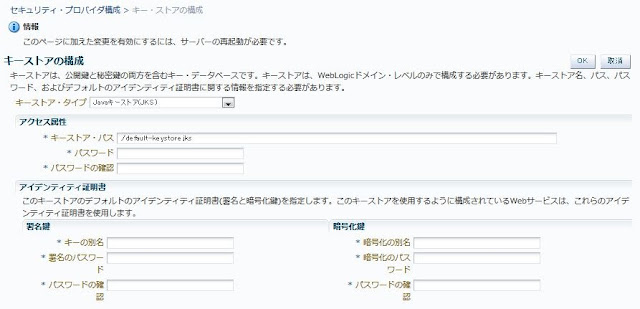
Figure 2: Oracle Web Services Manager Keystore Configuration
サーバーを再起動します。
Enterprise Manager Fusion Middleware Controlに再度アクセスし、新しいセキュリティポリシーを構成します。
<ファーム名>/Weblogicドメイン/<ドメイン名> を開き、[WebLogicドメイン] > [Webサービス] > [ポリシー]へと移動します。
Webサービス・ポリシーの画面で、サービス・クライアントに的ようするポリシーを検索します。
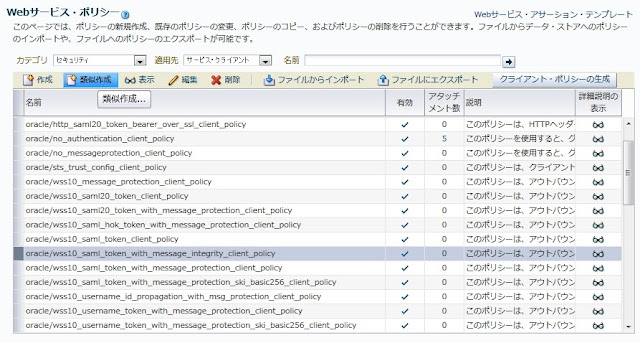
[oracle/wss10_saml_token_with_message_integrity_client_policy]を選択し、[類似作成]をクリックします。
Figure 3: Creating a web service policy
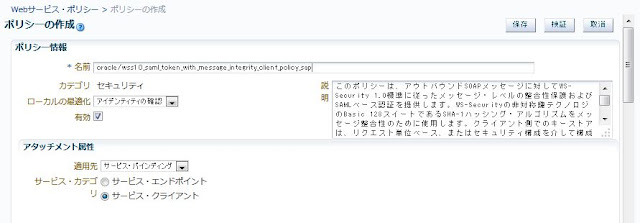
ポリシーの名前を変更します(例:oracle/wss10_saml_token_with_message_integrity_client_policy_sap
Figure 4: Rename the policy
Because ECC SAML Webサービスは署名付きのタイムスタンプを必要とするため、[設定]タブの[タイムスタンプを含める]にチェックを入れておきます。
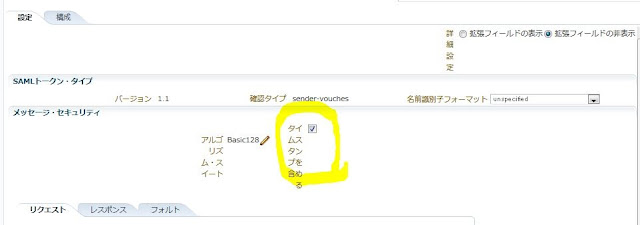
Figure 5: Include timestamp
それによって、Oracle Web Services Managerは署名付きのタイムスタンプをリクエストに追加し、署名済みのタイムスタンプがレスポンスにあることを期待します。しかしECCは、ECCは署名されていないタイムスタンプをレスポンスに含めて送信してくるため、Oracle Service Busでエラーが発生します。
oracle.wsm.security.policy.scenario.policycompliance.PolicyComplianceException: WSM-00036 : 
The signed message elements or parts do not comply with the policy. The following 
headers/elements () or attachments () must be signed:-
< http://docs.oasis-open.org/wss/2004/01/oasis-200401-wss-wssecurity-utility-1.0.xsd: Timestamp >
この問題を解決するため、[構成]タブに移動して、ignore.timestamp.in.responseというプロパティを追加し、その値としてtrueを設定します。この構成により、Oracle Web Services Managerはレスポンス中のタイムスタンプを検証しなくなります。
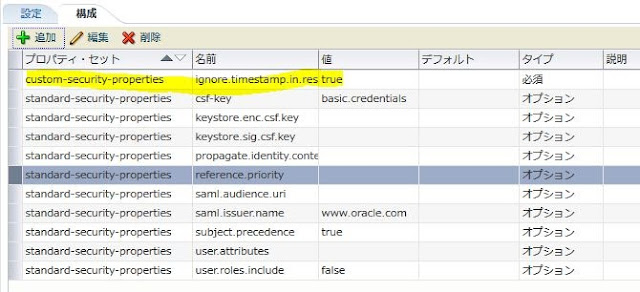
Figure 6: Add a property
saml.issuer.nameのフィールドはSAML Assertionの発行者を定義します(デフォルトではwww.oracle.comになっています)。この値を変更することができますが、Oracle Service Busから到着するSAML Assertionを受け付けるよう、SAP ECCで発行者が構成されている必要があります。
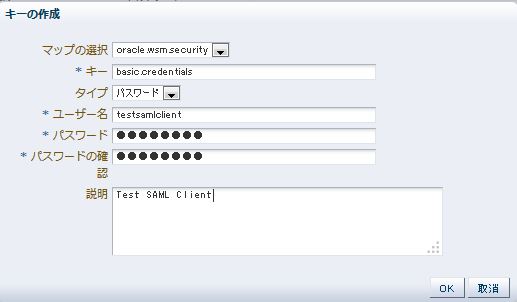
csf-keyプロパティはデフォルトでbasic.credentialsを使うよう定義されています。<FARM>/Weblogicドメイン/<ドメイン名>をクリックし、メニューから WebLogicドメイン] > [セキュリティ]> [資格証明]へと移動し、testsamlclientユーザーを通知するbasic.credentialsという名前を持つ新しいキーをoracle.wsm.security下に作成します。
Figure 7: Create Key
必要に応じて、新しい資格証明キーを定義したり、csf-keyプロパティの値を変更したりできます。

実装

Oracle Enterprise Pack for Eclipse (OEPE) を開き、ビジネスサービスをECCのWSDLから生成し、名前を付けます(例:TestSamlClient)。

以下はECCのWSDLのサンプルです。
<?xml version="1.0" encoding="utf-8"?>
<wsdl:definitions targetNamespace="urn:sap-com:document:sap:soap:functions:mc-style"
                  xmlns:wsdl="http://schemas.xmlsoap.org/wsdl/"
                  xmlns:xsd="http://www.w3.org/2001/XMLSchema"
                  xmlns:soap="http://schemas.xmlsoap.org/wsdl/soap/"
                  xmlns:wsoap12="http://schemas.xmlsoap.org/wsdl/soap12/"
                  xmlns:http="http://schemas.xmlsoap.org/wsdl/http/"
                  xmlns:mime="http://schemas.xmlsoap.org/wsdl/mime/"
                  xmlns:tns="urn:sap-com:document:sap:soap:functions:mc-style"
                  xmlns:wsp="http://schemas.xmlsoap.org/ws/2004/09/policy"
                  xmlns:wsu="http://docs.oasis-open.org/wss/2004/01/oasis-200401-wss-wssecurity-utility-1.0.xsd"
                  xmlns:n1="urn:sap-com:document:sap:rfc:functions">
  <wsdl:documentation>
    <sidl:sidl xmlns:sidl="http://www.sap.com/2007/03/sidl"/>
  </wsdl:documentation>
  <wsp:UsingPolicy wsdl:required="true"/>
  <wsp:Policy wsu:Id="BN_BN_YS_SAMLTEST">
    <saptrnbnd:OptimizedXMLTransfer uri="http://xml.sap.com/2006/11/esi/esp/binxml"
                                    xmlns:saptrnbnd="http://www.sap.com/webas/710/soap/features/transportbinding/"
                                    wsp:Optional="true"/>
    <saptrnbnd:OptimizedMimeSerialization xmlns:saptrnbnd="http://schemas.xmlsoap.org/ws/2004/09/policy/optimizedmimeserialization"
                                          wsp:Optional="true"/>
    <wsp:ExactlyOne xmlns:wsp="http://schemas.xmlsoap.org/ws/2004/09/policy">
      <wsp:All>
        <sp:AsymmetricBinding xmlns:sp="http://docs.oasis-open.org/ws-sx/ws-securitypolicy/200702"
                              xmlns:sapsp="http://www.sap.com/webas/630/soap/features/security/policy"
                              xmlns:wsa="http://www.w3.org/2005/08/addressing"
                              xmlns:wst="http://docs.oasis-open.org/ws-sx/ws-trust/200512"
                              xmlns:wsu="http://schemas.xmlsoap.org/ws/2002/07/utility"
                              xmlns:wsx="http://schemas.xmlsoap.org/ws/2004/09/mex">
          <wsp:Policy>
            <sp:InitiatorSignatureToken>
              <wsp:Policy>
                <sp:X509Token sp:IncludeToken="http://docs.oasis-open.org/ws-sx/ws-securitypolicy/200702/IncludeToken/AlwaysToRecipient">
                  <wsp:Policy>
                    <sp:WssX509V3Token10/>
                  </wsp:Policy>
                </sp:X509Token>
              </wsp:Policy>
            </sp:InitiatorSignatureToken>
            <sp:AlgorithmSuite>
              <wsp:Policy>
                <sp:Basic128Rsa15/>
              </wsp:Policy>
            </sp:AlgorithmSuite>
            <sp:Layout>
              <wsp:Policy>
                <sp:Strict/>
              </wsp:Policy>
            </sp:Layout>
            <sp:IncludeTimestamp/>
            <sp:OnlySignEntireHeadersAndBody/>
          </wsp:Policy>
        </sp:AsymmetricBinding>
        <sp:Wss10 xmlns:sp="http://docs.oasis-open.org/ws-sx/ws-securitypolicy/200702"
                  xmlns:sapsp="http://www.sap.com/webas/630/soap/features/security/policy"
                  xmlns:wsa="http://www.w3.org/2005/08/addressing"
                  xmlns:wst="http://docs.oasis-open.org/ws-sx/ws-trust/200512"
                  xmlns:wsu="http://schemas.xmlsoap.org/ws/2002/07/utility"
                  xmlns:wsx="http://schemas.xmlsoap.org/ws/2004/09/mex">
          <wsp:Policy>
            <sp:MustSupportRefKeyIdentifier/>
            <sp:MustSupportRefIssuerSerial/>
          </wsp:Policy>
        </sp:Wss10>
        <sp:SignedParts xmlns:sp="http://docs.oasis-open.org/ws-sx/ws-securitypolicy/200702"
                        xmlns:sapsp="http://www.sap.com/webas/630/soap/features/security/policy"
                        xmlns:wsa="http://www.w3.org/2005/08/addressing"
                        xmlns:wst="http://docs.oasis-open.org/ws-sx/ws-trust/200512"
                        xmlns:wsu="http://schemas.xmlsoap.org/ws/2002/07/utility"
                        xmlns:wsx="http://schemas.xmlsoap.org/ws/2004/09/mex">
          <sp:Body/>
          <sp:Header Name="Trace"
                     Namespace="http://www.sap.com/webas/630/soap/features/runtime/tracing/"/>
          <sp:Header Name="messageId"
                     Namespace="http://www.sap.com/webas/640/soap/features/messageId/"/>
          <sp:Header Name="CallerInformation"
                     Namespace="http://www.sap.com/webas/712/soap/features/runtime/metering/"/>
          <sp:Header Name="Session"
                     Namespace="http://www.sap.com/webas/630/soap/features/session/"/>
          <sp:Header Name="To"
                     Namespace="http://schemas.xmlsoap.org/ws/2004/08/addressing"/>
          <sp:Header Name="From"
                     Namespace="http://schemas.xmlsoap.org/ws/2004/08/addressing"/>
          <sp:Header Name="FaultTo"
                     Namespace="http://schemas.xmlsoap.org/ws/2004/08/addressing"/>
          <sp:Header Name="ReplyTo"
                     Namespace="http://schemas.xmlsoap.org/ws/2004/08/addressing"/>
          <sp:Header Name="MessageID"
                     Namespace="http://schemas.xmlsoap.org/ws/2004/08/addressing"/>
          <sp:Header Name="RelatesTo"
                     Namespace="http://schemas.xmlsoap.org/ws/2004/08/addressing"/>
          <sp:Header Name="Action"
                     Namespace="http://schemas.xmlsoap.org/ws/2004/08/addressing"/>
          <sp:Header Name="To"
                     Namespace="http://www.w3.org/2005/08/addressing"/>
          <sp:Header Name="From"
                     Namespace="http://www.w3.org/2005/08/addressing"/>
          <sp:Header Name="FaultTo"
                     Namespace="http://www.w3.org/2005/08/addressing"/>
          <sp:Header Name="ReplyTo"
                     Namespace="http://www.w3.org/2005/08/addressing"/>
          <sp:Header Name="MessageID"
                     Namespace="http://www.w3.org/2005/08/addressing"/>
          <sp:Header Name="RelatesTo"
                     Namespace="http://www.w3.org/2005/08/addressing"/>
          <sp:Header Name="Action"
                     Namespace="http://www.w3.org/2005/08/addressing"/>
          <sp:Header Name="ReferenceParameters"
                     Namespace="http://www.w3.org/2005/08/addressing"/>
          <sp:Header Name="Sequence"
                     Namespace="http://schemas.xmlsoap.org/ws/2005/02/rm"/>
          <sp:Header Name="SequenceAcknowledgement"
                     Namespace="http://schemas.xmlsoap.org/ws/2005/02/rm"/>
          <sp:Header Name="AckRequested"
                     Namespace="http://schemas.xmlsoap.org/ws/2005/02/rm"/>
          <sp:Header Name="SequenceFault"
                     Namespace="http://schemas.xmlsoap.org/ws/2005/02/rm"/>
          <sp:Header Name="Sequence"
                     Namespace="http://docs.oasis-open.org/ws-rx/wsrm/200702"/>
          <sp:Header Name="AckRequested"
                     Namespace="http://docs.oasis-open.org/ws-rx/wsrm/200702"/>
          <sp:Header Name="SequenceAcknowledgement"
                     Namespace="http://docs.oasis-open.org/ws-rx/wsrm/200702"/>
          <sp:Header Name="SequenceFault"
                     Namespace="http://docs.oasis-open.org/ws-rx/wsrm/200702"/>
          <sp:Header Name="UsesSequenceSTR"
                     Namespace="http://docs.oasis-open.org/ws-rx/wsrm/200702"/>
          <sp:Header Name="UsesSequenceSSL"
                     Namespace="http://docs.oasis-open.org/ws-rx/wsrm/200702"/>
        </sp:SignedParts>
        <sp:SignedSupportingTokens xmlns:sp="http://docs.oasis-open.org/ws-sx/ws-securitypolicy/200702"
                                   xmlns:sapsp="http://www.sap.com/webas/630/soap/features/security/policy"
                                   xmlns:wsa="http://www.w3.org/2005/08/addressing"
                                   xmlns:wst="http://docs.oasis-open.org/ws-sx/ws-trust/200512"
                                   xmlns:wsu="http://schemas.xmlsoap.org/ws/2002/07/utility"
                                   xmlns:wsx="http://schemas.xmlsoap.org/ws/2004/09/mex">
          <wsp:Policy>
            <sp:SamlToken sp:IncludeToken="http://docs.oasis-open.org/ws-sx/ws-securitypolicy/200702/IncludeToken/AlwaysToRecipient">
              <wsp:Policy>
                <sp:WssSamlV11Token10/>
              </wsp:Policy>
            </sp:SamlToken>
          </wsp:Policy>
        </sp:SignedSupportingTokens>
      </wsp:All>
    </wsp:ExactlyOne>
    <wsaw:UsingAddressing xmlns:wsaw="http://www.w3.org/2006/05/addressing/wsdl"
                          wsp:Optional="true"/>
  </wsp:Policy>
  <wsp:Policy wsu:Id="BN_BN_YS_SAMLTEST_SOAP12">
    <saptrnbnd:OptimizedXMLTransfer uri="http://xml.sap.com/2006/11/esi/esp/binxml"
                                    xmlns:saptrnbnd="http://www.sap.com/webas/710/soap/features/transportbinding/"
                                    wsp:Optional="true"/>
    <saptrnbnd:OptimizedMimeSerialization xmlns:saptrnbnd="http://schemas.xmlsoap.org/ws/2004/09/policy/optimizedmimeserialization"
                                          wsp:Optional="true"/>
    <wsp:ExactlyOne xmlns:wsp="http://schemas.xmlsoap.org/ws/2004/09/policy">
      <wsp:All>
        <sp:AsymmetricBinding xmlns:sp="http://docs.oasis-open.org/ws-sx/ws-securitypolicy/200702"
                              xmlns:sapsp="http://www.sap.com/webas/630/soap/features/security/policy"
                              xmlns:wsa="http://www.w3.org/2005/08/addressing"
                              xmlns:wst="http://docs.oasis-open.org/ws-sx/ws-trust/200512"
                              xmlns:wsu="http://schemas.xmlsoap.org/ws/2002/07/utility"
                              xmlns:wsx="http://schemas.xmlsoap.org/ws/2004/09/mex">
          <wsp:Policy>
            <sp:InitiatorSignatureToken>
              <wsp:Policy>
                <sp:X509Token sp:IncludeToken="http://docs.oasis-open.org/ws-sx/ws-securitypolicy/200702/IncludeToken/AlwaysToRecipient">
                  <wsp:Policy>
                    <sp:WssX509V3Token10/>
                  </wsp:Policy>
                </sp:X509Token>
              </wsp:Policy>
            </sp:InitiatorSignatureToken>
            <sp:AlgorithmSuite>
              <wsp:Policy>
                <sp:Basic128Rsa15/>
              </wsp:Policy>
            </sp:AlgorithmSuite>
            <sp:Layout>
              <wsp:Policy>
                <sp:Strict/>
              </wsp:Policy>
            </sp:Layout>
            <sp:IncludeTimestamp/>
            <sp:OnlySignEntireHeadersAndBody/>
          </wsp:Policy>
        </sp:AsymmetricBinding>
        <sp:Wss10 xmlns:sp="http://docs.oasis-open.org/ws-sx/ws-securitypolicy/200702"
                  xmlns:sapsp="http://www.sap.com/webas/630/soap/features/security/policy"
                  xmlns:wst="http://docs.oasis-open.org/ws-sx/ws-trust/200512"
                  xmlns:wsu="http://schemas.xmlsoap.org/ws/2002/07/utility"
                  xmlns:wsx="http://schemas.xmlsoap.org/ws/2004/09/mex">
          <wsp:Policy>
            <sp:MustSupportRefKeyIdentifier/>
            <sp:MustSupportRefIssuerSerial/>
          </wsp:Policy>
        </sp:Wss10>
        <sp:SignedParts xmlns:sp="http://docs.oasis-open.org/ws-sx/ws-securitypolicy/200702"
                        xmlns:sapsp="http://www.sap.com/webas/630/soap/features/security/policy"
                        xmlns:wsa="http://www.w3.org/2005/08/addressing"
                        xmlns:wst="http://docs.oasis-open.org/ws-sx/ws-trust/200512"
                        xmlns:wsu="http://schemas.xmlsoap.org/ws/2002/07/utility"
                        xmlns:wsx="http://schemas.xmlsoap.org/ws/2004/09/mex">
          <sp:Body/>
          <sp:Header Name="Trace"
                     Namespace="http://www.sap.com/webas/630/soap/features/runtime/tracing/"/>
          <sp:Header Name="messageId"
                     Namespace="http://www.sap.com/webas/640/soap/features/messageId/"/>
          <sp:Header Name="CallerInformation"
                     Namespace="http://www.sap.com/webas/712/soap/features/runtime/metering/"/>
          <sp:Header Name="Session"
                     Namespace="http://www.sap.com/webas/630/soap/features/session/"/>
          <sp:Header Name="To"
                     Namespace="http://schemas.xmlsoap.org/ws/2004/08/addressing"/>
          <sp:Header Name="From"
                     Namespace="http://schemas.xmlsoap.org/ws/2004/08/addressing"/>
          <sp:Header Name="FaultTo"
                     Namespace="http://schemas.xmlsoap.org/ws/2004/08/addressing"/>
          <sp:Header Name="ReplyTo"
                     Namespace="http://schemas.xmlsoap.org/ws/2004/08/addressing"/>
          <sp:Header Name="MessageID"
                     Namespace="http://schemas.xmlsoap.org/ws/2004/08/addressing"/>
          <sp:Header Name="RelatesTo"
                     Namespace="http://schemas.xmlsoap.org/ws/2004/08/addressing"/>
          <sp:Header Name="Action"
                     Namespace="http://schemas.xmlsoap.org/ws/2004/08/addressing"/>
          <sp:Header Name="To"
                     Namespace="http://www.w3.org/2005/08/addressing"/>
          <sp:Header Name="From"
                     Namespace="http://www.w3.org/2005/08/addressing"/>
          <sp:Header Name="FaultTo"
                     Namespace="http://www.w3.org/2005/08/addressing"/>
          <sp:Header Name="ReplyTo"
                     Namespace="http://www.w3.org/2005/08/addressing"/>
          <sp:Header Name="MessageID"
                     Namespace="http://www.w3.org/2005/08/addressing"/>
          <sp:Header Name="RelatesTo"
                     Namespace="http://www.w3.org/2005/08/addressing"/>
          <sp:Header Name="Action"
                     Namespace="http://www.w3.org/2005/08/addressing"/>
          <sp:Header Name="ReferenceParameters"
                     Namespace="http://www.w3.org/2005/08/addressing"/>
          <sp:Header Name="Sequence"
                     Namespace="http://schemas.xmlsoap.org/ws/2005/02/rm"/>
          <sp:Header Name="SequenceAcknowledgement"
                     Namespace="http://schemas.xmlsoap.org/ws/2005/02/rm"/>
          <sp:Header Name="AckRequested"
                     Namespace="http://schemas.xmlsoap.org/ws/2005/02/rm"/>
          <sp:Header Name="SequenceFault"
                     Namespace="http://schemas.xmlsoap.org/ws/2005/02/rm"/>
          <sp:Header Name="Sequence"
                     Namespace="http://docs.oasis-open.org/ws-rx/wsrm/200702"/>
          <sp:Header Name="AckRequested"
                     Namespace="http://docs.oasis-open.org/ws-rx/wsrm/200702"/>
          <sp:Header Name="SequenceAcknowledgement"
                     Namespace="http://docs.oasis-open.org/ws-rx/wsrm/200702"/>
          <sp:Header Name="SequenceFault"
                     Namespace="http://docs.oasis-open.org/ws-rx/wsrm/200702"/>
          <sp:Header Name="UsesSequenceSTR"
                     Namespace="http://docs.oasis-open.org/ws-rx/wsrm/200702"/>
          <sp:Header Name="UsesSequenceSSL"
                     Namespace="http://docs.oasis-open.org/ws-rx/wsrm/200702"/>
        </sp:SignedParts>
        <sp:SignedSupportingTokens xmlns:sp="http://docs.oasis-open.org/ws-sx/ws-securitypolicy/200702"
                                   xmlns:sapsp="http://www.sap.com/webas/630/soap/features/security/policy"
                                   xmlns:wsa="http://www.w3.org/2005/08/addressing"
                                   xmlns:wst="http://docs.oasis-open.org/ws-sx/ws-trust/200512"
                                   xmlns:wsu="http://schemas.xmlsoap.org/ws/2002/07/utility"
                                   xmlns:wsx="http://schemas.xmlsoap.org/ws/2004/09/mex">
          <wsp:Policy>
            <sp:SamlToken sp:IncludeToken="http://docs.oasis-open.org/ws-sx/ws-securitypolicy/200702/IncludeToken/AlwaysToRecipient">
              <wsp:Policy>
                <sp:WssSamlV11Token10/>
              </wsp:Policy>
            </sp:SamlToken>
          </wsp:Policy>
        </sp:SignedSupportingTokens>
      </wsp:All>
    </wsp:ExactlyOne>
    <wsaw:UsingAddressing xmlns:wsaw="http://www.w3.org/2006/05/addressing/wsdl"
                          wsp:Optional="true"/>
  </wsp:Policy>
  <wsp:Policy wsu:Id="IF_IF_YS_SAMLTEST">
    <sapsession:Session xmlns:sapsession="http://www.sap.com/webas/630/soap/features/session/">
      <sapsession:enableSession>false</sapsession:enableSession>
    </sapsession:Session>
    <sapcentraladmin:CentralAdministration xmlns:sapcentraladmin="http://www.sap.com/webas/700/soap/features/CentralAdministration/"
                                           wsp:Optional="true">
      <sapcentraladmin:BusinessApplicationID>4FF6C4A0570F00E9E10000000A1D140F</sapcentraladmin:BusinessApplicationID>
    </sapcentraladmin:CentralAdministration>
  </wsp:Policy>
  <wsp:Policy wsu:Id="OP_IF_OP_YsSamltest">
    <sapcomhnd:enableCommit xmlns:sapcomhnd="http://www.sap.com/NW05/soap/features/commit/">false</sapcomhnd:enableCommit>
    <sapblock:enableBlocking xmlns:sapblock="http://www.sap.com/NW05/soap/features/blocking/">true</sapblock:enableBlocking>
    <saptrhnw05:required xmlns:saptrhnw05="http://www.sap.com/NW05/soap/features/transaction/">no</saptrhnw05:required>
    <saprmnw05:enableWSRM xmlns:saprmnw05="http://www.sap.com/NW05/soap/features/wsrm/">false</saprmnw05:enableWSRM>
  </wsp:Policy>
  <wsdl:types>
    <xsd:schema attributeFormDefault="qualified"
                targetNamespace="urn:sap-com:document:sap:rfc:functions">
      <xsd:simpleType name="char10">
        <xsd:restriction base="xsd:string">
          <xsd:maxLength value="10"/>
        </xsd:restriction>
      </xsd:simpleType>
      <xsd:simpleType name="char40">
        <xsd:restriction base="xsd:string">
          <xsd:maxLength value="40"/>
        </xsd:restriction>
      </xsd:simpleType>
    </xsd:schema>
    <xsd:schema attributeFormDefault="qualified"
                targetNamespace="urn:sap-com:document:sap:soap:functions:mc-style"
                xmlns:n0="urn:sap-com:document:sap:rfc:functions">
      <xsd:import namespace="urn:sap-com:document:sap:rfc:functions"/>
      <xsd:element name="YsSamltest">
        <xsd:complexType>
          <xsd:sequence>
            <xsd:element name="Text" type="n0:char10" minOccurs="0"/>
          </xsd:sequence>
        </xsd:complexType>
      </xsd:element>
      <xsd:element name="YsSamltestResponse">
        <xsd:complexType>
          <xsd:sequence>
            <xsd:element name="Result" type="n0:char40"/>
          </xsd:sequence>
        </xsd:complexType>
      </xsd:element>
    </xsd:schema>
  </wsdl:types>
  <wsdl:message name="YsSamltest">
    <wsdl:part name="parameters" element="tns:YsSamltest"/>
  </wsdl:message>
  <wsdl:message name="YsSamltestResponse">
    <wsdl:part name="parameter" element="tns:YsSamltestResponse"/>
  </wsdl:message>
  <wsdl:portType name="YS_SAMLTEST">
    <wsp:Policy>
      <wsp:PolicyReference URI="#IF_IF_YS_SAMLTEST"/>
    </wsp:Policy>
    <wsdl:operation name="YsSamltest">
      <wsp:Policy>
        <wsp:PolicyReference URI="#OP_IF_OP_YsSamltest"/>
      </wsp:Policy>
      <wsdl:input message="tns:YsSamltest"/>
      <wsdl:output message="tns:YsSamltestResponse"/>
    </wsdl:operation>
  </wsdl:portType>
  <wsdl:binding name="YS_SAMLTEST" type="tns:YS_SAMLTEST">
    <wsp:Policy>
      <wsp:PolicyReference URI="#BN_BN_YS_SAMLTEST"/>
    </wsp:Policy>
    <soap:binding transport="http://schemas.xmlsoap.org/soap/http"
                  style="document"/>
    <wsdl:operation name="YsSamltest">
      <soap:operation style="document"/>
      <wsdl:input>
        <soap:body use="literal"/>
      </wsdl:input>
      <wsdl:output>
        <soap:body use="literal"/>
      </wsdl:output>
    </wsdl:operation>
  </wsdl:binding>
  <wsdl:binding name="YS_SAMLTEST_SOAP12" type="tns:YS_SAMLTEST">
    <wsp:Policy>
      <wsp:PolicyReference URI="#BN_BN_YS_SAMLTEST_SOAP12"/>
    </wsp:Policy>
    <wsoap12:binding transport="http://schemas.xmlsoap.org/soap/http"
                     style="document"/>
    <wsdl:operation name="YsSamltest">
      <wsoap12:operation style="document"/>
      <wsdl:input>
        <wsoap12:body use="literal"/>
      </wsdl:input>
      <wsdl:output>
        <wsoap12:body use="literal"/>
      </wsdl:output>
    </wsdl:operation>
  </wsdl:binding>
  <wsdl:service name="YS_SAMLTEST">
    <wsdl:port name="YS_SAMLTEST" binding="tns:YS_SAMLTEST">
      <soap:address location="http://poc-sap:8021/sap/bc/srt/rfc/sap/ys_samltest/200/ys_samltest/ys_samltest"/>
    </wsdl:port>
    <wsdl:port name="YS_SAMLTEST_SOAP12" binding="tns:YS_SAMLTEST_SOAP12">
      <wsoap12:address location="http://poc-sap:8021/sap/bc/srt/rfc/sap/ys_samltest/200/ys_samltest/ys_samltest"/>
    </wsdl:port>
  </wsdl:service>
</wsdl:definitions>
ビジネスサービス作成後、以下のエラーを確認するかと思います。
"[OSB Kernel:398133]The service is based on WSDL with Web Services Security Policies that are not natively supported by Oracle Service Bus. Please select OWSM Policies - From OWSM Policy Store option and attach equivalent OWSM security policy." (See Figure 8参照)
1964583.gif
Figure 8: Policy Error
このエラーはOracle WebLogic ServerがOracle Web Services Managerとは異なり、ECCのWSDLにあるポリシーをサポートしていないために発生します。現時点では、このエラーを避けるためには、サービスポリシー構成を「From OWSM Policy Store」に変更しましょう。ポリシーをOracle Service Bus管理コンソールからのみ設定します。Oracle Service Busサーバーが立ち上がっていれば、必要に応じて、Oracle Web Services ManagerポリシーをOEPEから追加することができます。
プロキシサービスをビジネスサービスから作成すると、同じポリシーエラーが出てきます。[Policy]タブで Service Policy Configuration[From Pre-defined Policy or WS-Policy Resource]に変更します。Figure 9では、プロキシサービスにはポリシーは不要です。
1964584.gif
Figure 9: Create proxy service
HTTP Transport]タブで、[Authentication]を[Basic]に変更します。これが必要なのは、ビジネスサービスで、Oracle Web Services Managerが認証済みユーザー名を使ってSAML Assertionを生成するためです。

Oracle Service Busの構成jarファイルをエクスポートします。

Oracle Service Busの構成


Oracle Service Bus管理コンソールにアクセスし、OSB構成jarファイルをサーバーにインポートします。
ビジネスサービスを構成し、Oracle Web Services Managerで作成したカスタムポリシーを追加します。
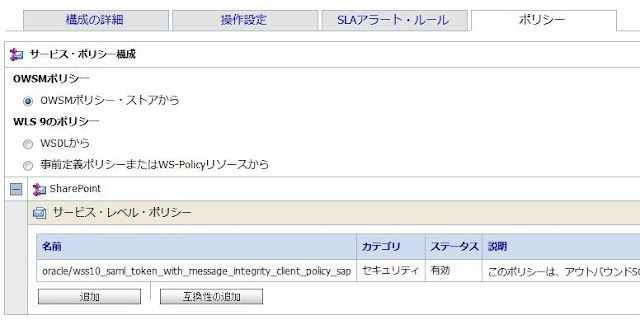
Figure 10:  Service Policy Configuration
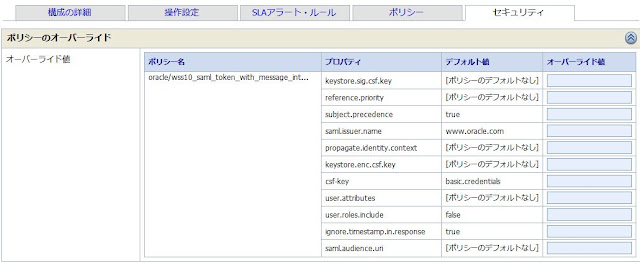
ポリシーを適用後、[セキュリティ]タブでプロパティの値を変更できます。
Figure 11: Policy Overrides
(注意)ビジネスサービスで振る舞いを変更する必要があれば、ここでポリシーのプロパティ値を変更することができます(例:異なる署名の証明書)。

テストの前に


テストの前に検証ポイントをご紹介します。
OracleとSAPのマシンの時計が同期されていることを確認し、ECCで適切なクロックスキューを設定します。未来の時刻、もしくは定義したクロックスキューよりも大きなタイムスタンプを持つメッセージをOracle Service Busが送信すると、ECCは呼びだしを拒否します。SAML Assertionに含まれているユーザーは、ECCでユーザー·ストアの既存のユーザーとマッピングする必要があります。ECCではユーザー名の大文字と小文字を区別します。
ECCがOracle Web Services Managerが使うSAML Issuerを受け入れるように設定しておきましょう。
すべての必要な証明書がキーストアにOracle Web Services ManagerおよびECCにインポートされていることを確認しましょう。

テスト


プロキシサービスのWSDL URLを取得し、サービスをテストします。例えば以下のような具合です。
http://<host>:<port>/TestSecSap/ProxyServices/TestSamlClient?WSDL
任意のWebサービスクライアントツール(例えばSoapUIなど)を使ってサービスをテストできます。
WebLogic Serverに作成したユーザーの資格証明を設定することをお忘れなく。

以下はリクエストメッセージのサンプルです。
<soapenv:Envelope xmlns:soapenv="http://schemas.xmlsoap.org/soap/envelope/"
                  xmlns:urn="urn:sap-com:document:sap:soap:functions:mc-style">
   <soapenv:Header/>
   <soapenv:Body>
      <urn:YsSamltest>
         <Text>test</Text>
      </urn:YsSamltest>
   </soapenv:Body>
</soapenv:Envelope>
Oracle Web Services Managerがポリシーを適用すると、ECCに送付されるリクエストは次のように変わります。
<?xml version="1.0" encoding="UTF-8"?>
<soapenv:Envelope xmlns:soapenv="http://schemas.xmlsoap.org/soap/envelope/"
                  xmlns:urn="urn:sap-com:document:sap:soap:functions:mc-style">
  <soapenv:Header>
    <wsse:Security soapenv:mustUnderstand="1"
                   xmlns:wsse="http://docs.oasis-open.org/wss/2004/01/oasis-200401-wss-wssecurity-secext-1.0.xsd">
      <wsse:SecurityTokenReference wsu:Id="STR-SAML-bCgQ6C7G7d3xvJEZ0Ap9Ag22"
                                   xmlns:wsu="http://docs.oasis-open.org/wss/2004/01/oasis-200401-wss-wssecurity-utility-1.0.xsd">
        <wsse:KeyIdentifier ValueType="http://docs.oasis-open.org/wss/oasis-wss-saml-token-profile-1.0#SAMLAssertionID">SAML-l0sKvVtSFWBxVSfO8DOYOQ22</wsse:KeyIdentifier>
      </wsse:SecurityTokenReference>
      <wsu:Timestamp wsu:Id="Timestamp-B8oMUcneIEM0FBP1WSzqiw22"
                     xmlns:wsu="http://docs.oasis-open.org/wss/2004/01/oasis-200401-wss-wssecurity-utility-1.0.xsd">
        <wsu:Created>2013-04-15T20:04:41Z</wsu:Created>
        <wsu:Expires>2013-04-15T20:09:41Z</wsu:Expires>
      </wsu:Timestamp>
      <wsse:BinarySecurityToken ValueType="http://docs.oasis-open.org/wss/2004/01/oasis-200401-wss-x509-token-profile-1.0#X509v3"
                                EncodingType="http://docs.oasis-open.org/wss/2004/01/ oasis-200401-wss-soap-message-security-1.0#Base64Binary"
                                wsu:Id="BST-umEAXBVw2Neuu90Yk43M6A22"
                                xmlns:wsu="http://docs.oasis-open.org/wss/2004/01/oasis-200401-wss-wssecurity-utility-1.0.xsd">MIIG1jCCBb6gAwI...CreDzVTHZz/xXtD2Vl8JsTN/QaKkZ1n88=</wsse:BinarySecurityToken>
      <saml:Assertion MajorVersion="1" MinorVersion="1"
                      AssertionID="SAML-l0sKvVtSFWBxVSfO8DOYOQ22"
                      IssueInstant="2013-04-15T20:04:41Z"
                      Issuer="www.oracle.com"
                      xmlns:saml="urn:oasis:names:tc:SAML:1.0:assertion">
        <saml:Conditions NotBefore="2013-04-15T20:04:41Z"
                         NotOnOrAfter="2013-04-15T20:09:41Z"/>
        <saml:AuthenticationStatement AuthenticationInstant="2013-04-15T20:04:41Z"
                                      AuthenticationMethod="urn:oasis:names:tc:SAML:1.0:am:password">
          <saml:Subject>
            <saml:NameIdentifier Format="urn:oasis:names:tc:SAML:1.1:nameid-format:unspecified">testsamlclient</saml:NameIdentifier>
            <saml:SubjectConfirmation>
              <saml:ConfirmationMethod>urn:oasis:names:tc:SAML:1.0:cm:sender-vouches</saml:ConfirmationMethod>
            </saml:SubjectConfirmation>
          </saml:Subject>
        </saml:AuthenticationStatement>
      </saml:Assertion>
      <dsig:Signature xmlns:dsig="http://www.w3.org/2000/09/xmldsig#">
        <dsig:SignedInfo>
          <dsig:CanonicalizationMethod Algorithm="http://www.w3.org/2001/10/xml-exc-c14n#"/>
          <dsig:SignatureMethod Algorithm="http://www.w3.org/2000/09/xmldsig#rsa-sha1"/>
          <dsig:Reference URI="#BST-umEAXBVw2Neuu90Yk43M6A22">
            <dsig:Transforms>
              <dsig:Transform Algorithm="http://www.w3.org/2001/10/xml-exc-c14n#"/>
            </dsig:Transforms>
            <dsig:DigestMethod Algorithm="http://www.w3.org/2000/09/xmldsig#sha1"/>
            <dsig:DigestValue>buSz7W4V5OQ4FTBZKf8YBIpBC1Y=</dsig:DigestValue>
          </dsig:Reference>
          <dsig:Reference URI="#Timestamp-B8oMUcneIEM0FBP1WSzqiw22">
            <dsig:Transforms>
              <dsig:Transform Algorithm="http://www.w3.org/2001/10/xml-exc-c14n#"/>
            </dsig:Transforms>
            <dsig:DigestMethod Algorithm="http://www.w3.org/2000/09/xmldsig#sha1"/>
            <dsig:DigestValue>psj9Sjk+bPTxUbqu1h8xUahVkrA=</dsig:DigestValue>
          </dsig:Reference>
          <dsig:Reference URI="#STR-SAML-bCgQ6C7G7d3xvJEZ0Ap9Ag22">
            <dsig:Transforms>
              <dsig:Transform Algorithm="http://docs.oasis-open.org/wss/2004/01/oasis-200401-wss-soap-message-security-1.0#STR-Transform">
                <wsse:TransformationParameters>
                  <dsig:CanonicalizationMethod Algorithm="http://www.w3.org/2001/10/xml-exc-c14n#"/>
                </wsse:TransformationParameters>
              </dsig:Transform>
            </dsig:Transforms>
            <dsig:DigestMethod Algorithm="http://www.w3.org/2000/09/xmldsig#sha1"/>
            <dsig:DigestValue>gMV488pINPLCAhWMzF6YGmBXySc=</dsig:DigestValue>
          </dsig:Reference>
          <dsig:Reference URI="#Body-qp7LuhCcRiNgYpIFe3OIyA22">
            <dsig:Transforms>
              <dsig:Transform Algorithm="http://www.w3.org/2001/10/xml-exc-c14n#"/>
            </dsig:Transforms>
            <dsig:DigestMethod Algorithm="http://www.w3.org/2000/09/xmldsig#sha1"/>
            <dsig:DigestValue>n6fRqeZ5AOg7GUSST0Y23bIftSg=</dsig:DigestValue>
          </dsig:Reference>
        </dsig:SignedInfo>
        <dsig:SignatureValue>f6TPUUzWLbpPCnpbBBNeIhmy8vp+03V7YWLxCPcSbbPeN1AcUBijFPsH35V90IBmhgbPX366S9Ouu52lYiKNTgWn8UPIEVeKHYKp742dHBSlqyxxVagJ7ddHjHgNbNn5QFuu/re6gcDAOVYwcGRDwpNPg+RnywQKkOfpgxtSdkLWz5ok7TjQcfApnur5gCQvmRsBJwuQcaI3WTuFfWLg5gCj+yazOgUkwb+l7Vbssl8LdTQ1WiQdBKmoAbWci2GL+VFfkaq0dGcYd2/oJLJtrehPiTW6GY/o7TmWY9L8cJOCJo86YPbKjfjn8WHuANe/AQRMAMkKnymUd424xS+C8g==</dsig:SignatureValue>
        <dsig:KeyInfo Id="KeyInfo-KYpO2OdhC7Q6fmBL1fonww22">
          <wsse:SecurityTokenReference>
            <wsse:Reference URI="#BST-umEAXBVw2Neuu90Yk43M6A22"
                            ValueType="http://docs.oasis-open.org/wss/2004/01/oasis-200401-wss-x509-token-profile-1.0#X509v3"/>
          </wsse:SecurityTokenReference>
        </dsig:KeyInfo>
      </dsig:Signature>
    </wsse:Security>
  </soapenv:Header>
  <soapenv:Body wsu:Id="Body-qp7LuhCcRiNgYpIFe3OIyA22"
                xmlns:wsu="http://docs.oasis-open.org/wss/2004/01/oasis-200401-wss-wssecurity-utility-1.0.xsd">
    <urn:YsSamltest>
      <!--Optional: -->
      <Text>test</Text>
    </urn:YsSamltest>
  </soapenv:Body>
</soapenv:Envelope>
ECCはリクエストを検証し、レスポンスをOracle Service Busに返します。
<soap-env:Envelope xmlns:soap-env="http://schemas.xmlsoap.org/soap/envelope/">
  <soap-env:Header xmlns:wsu="http://docs.oasis-open.org/wss/2004/01/oasis-200401-wss-wssecurity-utility-1.0.xsd">
    <wsse:Security xmlns:wsse="http://docs.oasis-open.org/wss/2004/01/oasis-200401-wss-wssecurity-secext-1.0.xsd">
      <wsu:Timestamp wsu:Id="ts-516B5F24AE9D1010E10080000A1D123D">
        <wsu:Created>2013-04-15T20:04:41Z</wsu:Created>
        <wsu:Expires>2013-04-15T20:06:11Z</wsu:Expires>
      </wsu:Timestamp>
    </wsse:Security>
  </soap-env:Header>
  <soap-env:Body>
    <n0:YsSamltestResponse xmlns:n0="urn:sap-com:document:sap:soap:functions:mc-style">
      <Result>Hello testsamlclient - PARAM: test</Result>
    </n0:YsSamltestResponse>
  </soap-env:Body>
</soap-env:Envelope>
Oracle Service Busはレスポンスをクライアントに返します。
<soap-env:Envelope xmlns:soap-env="http://schemas.xmlsoap.org/soap/envelope/">
   <soap-env:Header xmlns:wsu="http://docs.oasis-open.org/wss/2004/01/oasis-200401-wss-wssecurity-utility-1.0.xsd"/>
   <soap-env:Body>
      <n0:YsSamltestResponse xmlns:n0="urn:sap-com:document:sap:soap:functions:mc-style">
         <Result>Hello testsamlclient - PARAM: test</Result>
      </n0:YsSamltestResponse>
   </soap-env:Body>
</soap-env:Envelope>

まとめ

IDの伝播はセキュアな統合において非常に重要ですが、SAMLのようなテクノロジーを適用する方法は常に明快であるとは限りません。この記事が皆様の類似のシナリオにおいてお役に立つことを願っています。

著者について

Ronaldo FernandesはブラジルのOracle Consultingチームのprincipal consultantです。専門はOracle Fusion Middleware、SOA、セキュリティで、1996年からJavaテクノロジーを使って業務をしています。アーキテクチャ定義、問題解決、テクニカルリーダーシップおよびソフトウェア開発において15年以上の経験を有しています。